
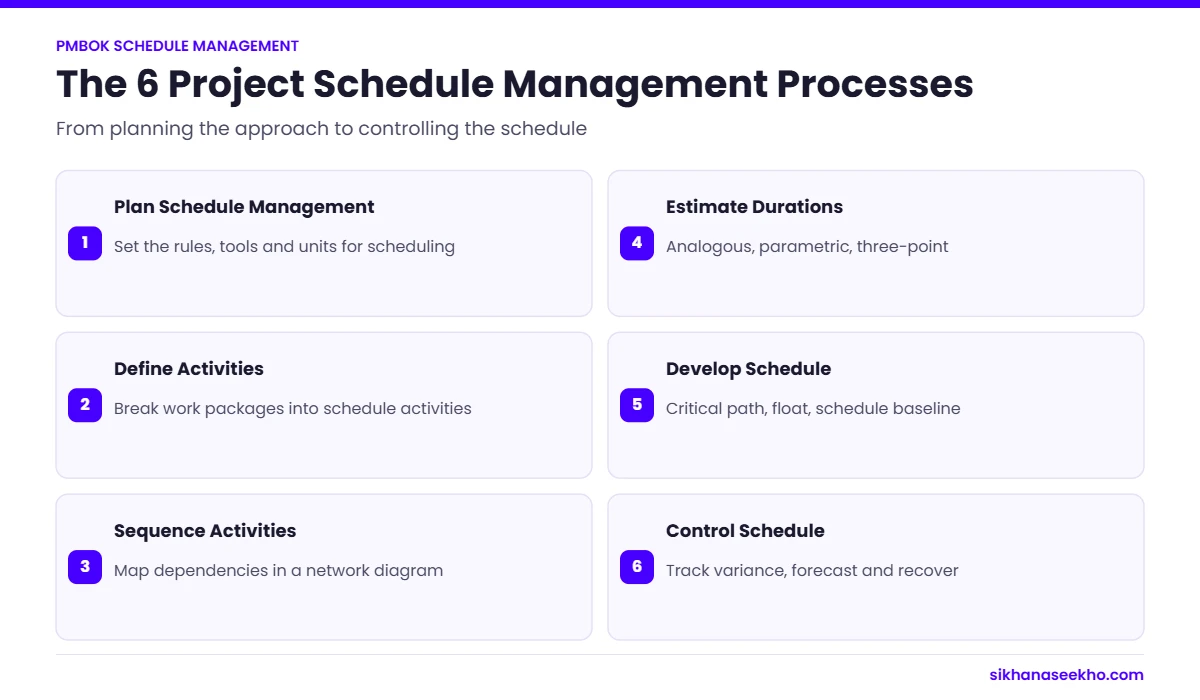
Project Schedule Management (PMBOK Knowledge Area 6) is the collection of six processes that ensure a project is completed on time. It covers Plan Schedule Management (defining the approach), Define Activities (breaking down work packages into schedulable activities), Sequence Activities (mapping logical dependencies between activities), Estimate Activity Durations (estimating how long each activity takes), Develop Schedule (analysing sequences and durations to create a time-phased schedule model), and Control Schedule (monitoring progress and managing changes). The central analytical tool is the Critical Path Method (CPM), which identifies the longest path through the network, the path that determines the project end date and has zero float. Schedule management is tightly interrelated with cost, scope, resource and risk management: delays on the critical path directly affect project cost, and scope changes almost always affect the schedule.
Schedule management is one of the most visible and heavily scrutinised aspects of project delivery. Every sponsor, steering group and client ultimately wants to know: will it be done on time? Every project manager needs to answer that question with confidence, not with a vague "we're on track" but with a structured, data-supported assessment of where the project stands relative to its baseline and what it will take to finish on time.
The six PMBOK processes in Schedule Management provide exactly this: a systematic methodology that transforms a list of work into a logical, time-phased network, identifies the activities that genuinely constrain the project end date (the critical path), and provides the tools to monitor, control and recover schedule performance when deviations occur.
This guide covers all six processes with full ITO breakdowns, the Critical Path Method in depth with a worked network example, all scheduling techniques (CPM, PERT, resource levelling, crashing, fast-tracking), how schedule management operates in Agile and hybrid environments, and how it interrelates with every other PMBOK knowledge area.
Project Schedule Management: The 6 PMBOK Processes
Schedule Management contains six processes: more than any other PMBOK knowledge area. Five belong to the Planning Process Group; one (Control Schedule) belongs to Monitoring and Controlling and runs continuously throughout execution. Click each to expand the full detail.
Plan Schedule Management produces the Schedule Management Plan: a component of the Project Management Plan that defines the scheduling methodology (CPM, critical chain, Agile iterations), the scheduling tool to be used, the level of accuracy required in duration estimates, the units of measure (hours, days, weeks), the thresholds that will trigger schedule variance reporting, and the rules for determining schedule progress (0/100, 50/50, physical % complete etc.).
This process happens early in planning, before any activities are defined or sequenced. It sets the rules that all subsequent schedule management processes follow. Without a Schedule Management Plan, different team members may use inconsistent approaches to estimating, sequencing and tracking: creating a schedule that is internally inconsistent and unreliable as a management tool.
Key decisions made in this process include: whether the project will use a time-scaled network diagram (Gantt chart) or activity-on-node (AON) notation, how change requests affecting the schedule baseline will be handled, and the frequency and format of schedule performance reporting.
- Project Charter
- Project Management Plan (Scope, Development Approach)
- Enterprise Environmental Factors
- Organisational Process Assets
- Expert judgement
- Data analysis (alternatives analysis)
- Meetings
- Schedule Management Plan
Define Activities decomposes work packages from the WBS into individual activities, the smallest schedulable units of work that can be estimated, sequenced, resourced and tracked. The distinction between a work package and an activity is important: a work package is a deliverable-oriented grouping of project work from the WBS; an activity is a specific action that must be taken to produce that deliverable. A single work package may decompose into multiple activities.
For example: WBS work package "Install database server" → Activities: "Procure server hardware", "Configure operating system", "Install database software", "Configure database parameters", "Conduct acceptance testing". Each activity is then individually sequenced, estimated and assigned.
Rolling wave planning is explicitly accommodated in this process: activities for near-term work are defined in detail while activities for future phases are defined at a higher level, to be progressively elaborated as the project advances. This is particularly relevant in Agile and hybrid environments where future scope is not fully defined.
- Schedule Management Plan
- Scope Baseline (WBS + WBS Dictionary)
- Enterprise Environmental Factors
- Organisational Process Assets
- Expert judgement
- Decomposition
- Rolling wave planning
- Meetings
- Activity List
- Activity Attributes
- Milestone List
- Change Requests
- Project Management Plan Updates
Sequence Activities creates the project network diagram, the logical map of how activities relate to one another. Every activity (except the very first and very last) must have at least one predecessor and one successor. The output is a Precedence Diagramming Method (PDM) network that becomes the foundation for Critical Path Method analysis.
The four types of logical dependencies (PDM relationships):
- Finish-to-Start (FS): the most common: Successor cannot start until the predecessor finishes. "Testing cannot start until development finishes."
- Finish-to-Finish (FF): Successor cannot finish until the predecessor finishes. "Documentation cannot finish until testing finishes."
- Start-to-Start (SS): Successor cannot start until the predecessor starts. "Training materials development cannot start until training design starts."
- Start-to-Finish (SF): the rarest: Successor cannot finish until the predecessor starts. Rarely used in practice.
Leads and lags are applied to dependency relationships to model real-world overlap or mandatory waiting periods. A lead is negative lag. It allows the successor to start before the predecessor finishes (overlap). A lag adds waiting time after a dependency is met before the successor can begin (e.g., a 3-day curing lag after concrete is poured). Leads and lags are adjustable parameters, not constraints.
- Schedule Management Plan
- Activity List and Attributes
- Milestone List
- Project Scope Statement
- Assumption Log
- EEFs and OPAs
- Precedence Diagramming Method (PDM)
- Dependency determination and integration
- Leads and lags
- Project management information system
- Project Schedule Network Diagrams
- Project Documents Updates (activity list, activity attributes, assumption log, milestone list)
Estimate Activity Durations assigns a time value to each activity in the activity list. Duration estimates are based on the work content of the activity, the resources assigned, and any calendar constraints (holidays, resource availability windows, working hours). Estimates are expressed in work periods (days, weeks) rather than elapsed calendar time, a 5-day duration estimate with a 5-day working week equals exactly one calendar week, but a 5-day estimate with holidays or part-time resources takes longer in calendar terms.
Key estimation techniques for duration:
- Analogous estimating: Uses duration data from similar past activities. Fast but less accurate. Best for early estimates or when detailed information is unavailable.
- Parametric estimating: Uses statistical relationships (lines of code per day, square metres per crew-day). Accurate for repeatable, measurable work.
- Three-point estimating (PERT): Triangular: (O + M + P) / 3. Beta/PERT: (O + 4M + P) / 6. Produces a weighted duration estimate that accounts for uncertainty. Also used to calculate standard deviation: σ = (P − O) / 6, which is used in schedule risk analysis.
- Bottom-up estimating: Estimates smaller components and aggregates. Most accurate when scope is well-defined.
- Reserve analysis: Adds schedule contingency reserves (buffer time) for identified risks and unknown unknowns. Schedule reserves are part of the schedule baseline.
Elapsed time vs effort: A 40-hour task assigned to one full-time resource takes 5 working days (elapsed time). The same task split between two half-time resources still takes 5 working days. Doubling the resources does not halve the duration unless the work is perfectly parallelisable. Most activities have coordination overhead that reduces the efficiency of additional resources (Brooks' Law).
- Schedule Management Plan
- Activity List and Attributes
- Resource Requirements
- Resource Calendars
- Project Scope Statement
- Risk Register
- Lessons Learned Register
- EEFs and OPAs
- Expert judgement
- Analogous estimating
- Parametric estimating
- Three-point estimating
- Bottom-up estimating
- Data analysis (reserve analysis, alternatives analysis)
- Decision making
- Meetings
- Duration Estimates
- Basis of Estimates
- Project Documents Updates
Develop Schedule is the most analytically complex process in Schedule Management. It takes the network diagram, duration estimates and resource information produced by the preceding processes and applies scheduling algorithms to calculate the schedule model. The primary output is the Schedule Baseline, the approved version of the schedule model against which actual performance is measured, and the Project Schedule, which shows planned start and finish dates for each activity.
The critical path method (CPM), resource levelling and schedule compression are the primary analytical tools used in this process. The schedule model is rarely correct on the first pass: the initial draft typically produces a project end date later than required, necessitating compression techniques or scope negotiation before the baseline can be established.
Schedule network analysis involves forward pass (calculating Early Start and Early Finish for each activity), backward pass (calculating Late Start and Late Finish), and float calculation (the amount of scheduling flexibility each activity has). Activities with zero float are on the critical path and cannot be delayed without delaying the project end date.
- Schedule Management Plan
- Activity List + Attributes
- Project Network Diagrams
- Duration Estimates + Basis
- Resource Requirements + Calendars
- Project Scope Statement
- Risk Register
- Project Assignments
- OPAs + EEFs
- Schedule network analysis
- Critical Path Method (CPM)
- Resource optimisation (levelling, smoothing)
- Data analysis (what-if, simulation)
- Leads and lags
- Schedule compression (crashing, fast-tracking)
- PMIS / scheduling software
- Agile release planning
- Schedule Baseline
- Project Schedule
- Schedule Data
- Project Calendars
- Change Requests
- Project Management Plan Updates
Control Schedule runs continuously from execution through project close. It has three distinct functions: monitoring actual progress against the schedule baseline, analysing variances and their impact on the project end date, and managing changes to the schedule baseline through integrated change control. Like Control Costs, Control Schedule is about management action, not just reporting.
The primary analytical tool is Schedule Variance (SV = EV − PV) and Schedule Performance Index (SPI = EV/PV) from Earned Value Management, which provide objective, cost-denominated schedule performance measures. Trend analysis (is SPI improving or deteriorating over time?), critical path analysis (has the critical path changed due to recent delays?), and what-if scenario analysis (what is the impact of this risk materialising?) are also used.
An important limitation of SPI: As a project approaches completion, SPI artificially trends toward 1.0 regardless of actual schedule performance, because EV approaches BAC regardless of whether work is late. This is why critical path analysis remains the primary schedule control tool even when EVM is in use. A project can have SPI = 0.9 but still be on critical path because the late activities have float.
- Project Management Plan (Schedule Baseline, Schedule Management Plan)
- Project Documents (Lessons Learned, Project Calendars, Schedule Data)
- Work Performance Data
- Organisational Process Assets
- Data analysis (EVM, variance analysis, trend analysis, what-if)
- Critical path method
- Resource optimisation
- Leads and lags
- Schedule compression
- PMIS
- Work Performance Information
- Schedule Forecasts
- Change Requests
- Project Management Plan Updates (Schedule Baseline)
- Project Documents Updates
The Critical Path Method: The Engine of Schedule Management
The Critical Path Method (CPM) is the analytical backbone of project schedule management. It determines the longest path through the project network, the sequence of activities that collectively defines the earliest possible project completion date. Any delay to a critical path activity delays the entire project by the same amount. Understanding CPM is essential for every project manager and is one of the most heavily tested topics on the PMP exam.
Forward Pass, Backward Pass and Float: Step by Step
Critical path analysis uses two mathematical passes through the network to calculate Early Start (ES), Early Finish (EF), Late Start (LS), Late Finish (LF) and Float for every activity.
| Term | Formula | What It Means | On Critical Path? |
|---|---|---|---|
| Early Start (ES) | = Max(EF of all predecessors) | Earliest an activity can start given all predecessors are complete | : |
| Early Finish (EF) | = ES + Duration − 1 | Earliest an activity can finish if it starts at ES | : |
| Late Finish (LF) | = Min(LS of all successors) | Latest an activity can finish without delaying the project end | : |
| Late Start (LS) | = LF − Duration + 1 | Latest an activity can start without delaying the project end | : |
| Total Float | = LS − ES = LF − EF | Total scheduling flexibility: how much delay is tolerable before the project end date moves | : |
| Critical Path Activity | Float = 0 | Any activity where Total Float = 0 lies on the critical path. A delay in this activity delays the project end. | ✓ YES |
| Free Float | = ES(successor) − EF(activity) | How much an activity can be delayed without delaying its immediate successor's Early Start | : |
Key Scheduling Techniques Every PM Must Know
Schedule Compression: Crashing vs Fast-Tracking
When the initial schedule model produces a project end date later than required, or when execution reveals that recovery is needed, schedule compression techniques are applied to shorten the critical path without changing the project scope.
Crashing adds resources to critical path activities to complete them faster, typically by authorising overtime, adding team members, acquiring additional equipment or engaging supplementary contractors.
- Always increases project cost: resources cost money
- Only applied to critical path activities (crashing non-critical activities buys no time)
- Should be applied to activities with the lowest cost-per-day-saved ratio first
- Subject to diminishing returns: doubling resources rarely halves duration
- Coordination overhead grows as team size increases (Brooks' Law)
- Requires a formal change request if it exceeds cost thresholds
The crashing decision: For each critical path activity, calculate the crash cost per day (cost to reduce duration by one day). Apply crashing in order of cheapest cost per day saved until the target duration is achieved.
Fast-tracking performs activities in parallel that were originally planned sequentially: changing Finish-to-Start dependencies to Start-to-Start or applying leads to existing FS dependencies.
- Does not necessarily increase direct cost (same resources, overlapping work)
- Increases risk: starting later activities before predecessors are complete creates rework risk if the predecessor output changes
- Only applicable where activities can genuinely be overlapped (not all sequential activities can be parallelised)
- Can increase coordination complexity and communication overhead
- Rework resulting from fast-tracking can erode or reverse the time savings
- Best used before crashing: lower cost but higher risk profile
The fast-tracking decision: Identify Finish-to-Start dependencies on the critical path where the successor can begin before the predecessor is fully complete. Apply a lead. Assess the rework risk of starting early: if the predecessor output is stable, the risk is lower; if it is likely to change, fast-tracking is riskier.
How Schedule Management Connects to Every Other Knowledge Area
Schedule Management in Agile, Waterfall and Hybrid Environments
Traditional waterfall schedule management follows the full six-process PMBOK model:
- Full WBS decomposition into activities before scheduling begins
- CPM network diagram with logical dependencies mapped for all activities
- Critical path calculated with forward/backward pass and float analysis
- Formal Schedule Baseline established and change-controlled
- Gantt charts as the primary communication artefact
- EVM-based schedule performance monitoring (SV, SPI)
- Crashing or fast-tracking applied when recovery is needed
- Stage gate milestones as formal schedule control points
Strength: Maximum predictability and formal governance over schedule changes. Limitation: Assumes scope is fully known upfront: schedule accuracy degrades as scope evolves.
In pure Agile environments, schedule management looks fundamentally different:
- Fixed iteration cadence (sprints of 1–4 weeks) replaces the Gantt chart
- Team velocity (story points completed per sprint) becomes the primary schedule forecasting tool
- Burn-down charts track remaining work against sprint time-box
- Burn-up charts track scope growth alongside work completed
- Backlog refinement continuously re-priorities what gets scheduled next
- Release planning forecasts the number of sprints needed to complete the prioritised backlog
- No formal activity-level CPM, the sprint boundary is the scheduling unit
- Schedule recovery is achieved by scope reduction (removing lower-priority backlog items), not crashing
Strength: Inherently adaptive: schedule adjusts to reality every sprint. Limitation: Less predictable for stakeholders who need firm delivery commitments far in advance.
Hybrid Schedule Management
Hybrid environments maintain formal schedule governance at the stage or programme level while using iterative delivery within stages. The programme schedule shows stage milestones, dependency handoffs between workstreams and key external commitments: all CPM-managed. Within each stage, delivery teams work in sprints with burn-down tracking. The PM manages schedule at stage level; the team manages schedule at sprint level.
The practical challenge in hybrid scheduling is translating between the two languages: the programme schedule talks in days and milestones, the delivery team talks in story points and velocity. The PM must maintain a coherent view that satisfies both. This often involves a velocity-to-days conversion ("if the team's velocity is 40 points per sprint and we have 280 points of remaining backlog, we need 7 sprints = 14 weeks") that bridges the two scheduling paradigms.
Schedule Management: 7 Exam Tips
Master Schedule Management for Your PMP or APM PMQ
Schedule management processes and Critical Path Method are among the most heavily tested areas in both the PMP exam and the APM PMQ. See the full exam guides for study strategy, question formats and practice resources.
Pingback: CAPM Certification: An Entry-Level Project Management Credential