Project Risk Management Identify, Analyse & Control
Every project has risks. The question is whether you discover them during planning, when you can do something about them, or during execution, when it is too late. I managed projects on EGA Head Office Al Taweelah, The Constellation Abu Dhabi and Abu Dhabi Mall. Risk management is what separates projects that surprise you from projects you control. This guide walks through the complete risk management process, from writing a proper risk statement through to monitoring residual risks at closure, with worked examples throughout.
Risk management is the systematic process of identifying, analysing, responding to and monitoring uncertain events that could affect a project's objectives. A risk is an uncertain event or condition that, if it occurs, has a positive or negative effect on project scope, schedule, cost or quality. Risks that have a negative effect are threats. Risks that have a positive effect are opportunities. Both require management. Most PMs focus on threats and ignore opportunities, leaving potential project benefits unrealised.
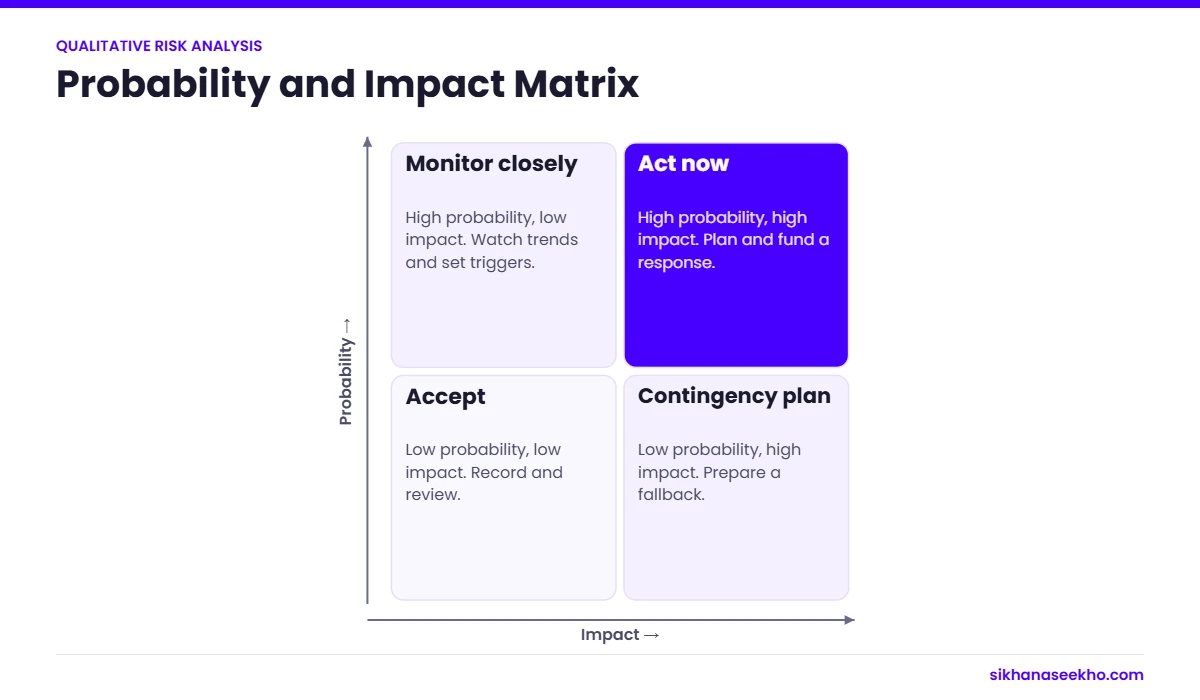
Prioritise risks by probability and impact.
Risk management is not about eliminating risk. That is impossible on any project worth doing. It is about making informed decisions with full visibility of uncertainty, ensuring the project's risk exposure is within the agreed tolerance of the sponsor and organisation, and having credible plans to respond when risks materialise.
The Seven PMBOK Risk Management Processes
1
Plan
Planning
2
Identify
Planning
3
Qualitative
Planning
4
Quantitative
Planning
5
Plan Resp.
Planning
6
Implement
Executing
7
Monitor
M&C
💡
Risks vs Issues: A risk is uncertain. It may or may not happen. An issue is something that has already happened and requires immediate management. When a risk materialises, it becomes an issue. Transfer it from the risk register to the issue log at that point and activate the contingency or response plan. Keeping risks and issues in the same register creates confusion about what needs immediate action and what is being monitored.
02: Identification
Identifying Risks: Techniques and Risk Statements
Risk identification should be systematic and iterative, not a single brainstorm at project initiation. New risks emerge as the project evolves, scope changes and the environment changes. The risk register should be a living document throughout the project lifecycle, not a document produced once and filed.
1
Brainstorming with the project team
Structured workshop with key team members. Use risk prompt questions: What could go wrong with scope? Schedule? Resources? Technology? External dependencies? What assumptions are we making that could be wrong? The team has operational knowledge the PM may not have.
2
Expert interviews
One-to-one interviews with subject matter experts, senior stakeholders and people who have run similar projects. Ask: "What are you most concerned about on this project?" People reveal risks in interviews that they would not raise in a group setting.
3
Lessons learned review
Review the risk registers and lessons learned from similar past projects in the organisation's archive. Many project risks are entirely predictable from historical data. The same integration challenges, the same vendor reliability issues, the same scope creep patterns appear project after project.
4
SWOT analysis
Strengths and Weaknesses generate internally sourced risks and opportunities. Opportunities and Threats from the external environment. SWOT is particularly useful for identifying strategic and organisational risks that technical brainstorming tends to miss.
5
Assumption and constraint analysis
Every assumption in the project plan is a potential risk: "We assume the vendor will deliver the API documentation by Week 3." What if they do not? Systematically converting assumptions into "if not true, then…" risk statements is one of the most reliable identification techniques.
6
Checklist analysis
Industry-standard and organisational risk checklists provide a structured prompt for categories of risk that projects commonly miss: regulatory and compliance, cybersecurity, supplier, political, environmental, resource and technology risks. Start with the checklist, then supplement with project-specific identification.
Writing a Proper Risk Statement
Vague risk statements lead to vague responses. A risk described as "Integration risk" or "Technology issues" cannot be prioritised, assigned or responded to. A well-structured risk statement has three components: cause, event and effect.
The Three-Part Risk Statement Format
Due to [CAUSE], there is a risk that [EVENT], which could result in [EFFECT on project objectives].
❌ Weak: "Integration risk with the legacy billing system."
✅ Strong: "Due to incomplete API documentation from the legacy billing system vendor, there is a risk that integration testing cannot begin on schedule in Week 9, which could result in a 2 to 3 week delay to the UAT start date and a corresponding slip to the go-live milestone."
The strong version can be prioritised (it has a specific schedule impact), assigned (the owner knows what to monitor), responded to (the response targets the cause: API documentation) and tracked (the trigger is clear: integration testing cannot begin). The weak version can do none of these things.
03: Qualitative Analysis
Qualitative Risk Analysis: Probability × Impact
Qualitative risk analysis prioritises risks using subjective assessments of probability and impact. It is fast, requires no specialist tools and is appropriate for all projects. The output is a ranked list of risks. The ones requiring most attention are identified for detailed response planning.
Each risk is scored on two dimensions: Probability (how likely is the risk to occur?) and Impact (how significantly would it affect project objectives if it did occur?). Multiplying the two scores gives a risk priority score that determines where in the register the risk sits.
Probability × Impact Matrix: 5×5 Scale
Very Low 0.1
Low 0.3
Medium 0.5
High 0.7
Very High 0.9
Very High 0.9
0.09
0.27
0.45
0.63
0.81
High 0.7
0.07
0.21
0.35
0.49
0.63
Medium 0.5
0.05
0.15
0.25
0.35
0.45
Low 0.3
0.03
0.09
0.15
0.21
0.27
Very Low 0.1
0.01
0.03
0.05
0.07
0.09
Low priority (score < 0.15)
Medium priority (0.15 to 0.35)
High priority (> 0.35)
📌
Probability and impact scales must be defined before scoring. "High probability" means different things to different people. Define the scale explicitly in the risk management plan, for example: Very High = above 70% chance of occurring; High = 50 to 70%; Medium = 30 to 50%; Low = 10 to 30%; Very Low = below 10%. Without defined thresholds, two PMs scoring the same risk will produce different results, making cross-project risk comparison impossible.
04: Quantitative Analysis
Quantitative Risk Analysis: EMV and Contingency
Quantitative risk analysis uses numerical data to model the overall financial and schedule effect of risks on project objectives. It is more data-intensive than qualitative analysis and typically reserved for high-value, high-complexity or high-risk projects. The most commonly used quantitative technique, and the most heavily tested on the PMP exam, is Expected Monetary Value (EMV).
Expected Monetary Value (EMV)
EMV calculates the statistical average outcome of a risk or decision by multiplying the probability of each outcome by its monetary impact and summing the results. Negative EMV values represent threats. Positive values represent opportunities.
Formula: EMV = Probability × Impact (in £/$ value)
The sum of all risk EMV values across the register provides an evidence-based estimate of the contingency reserve needed for the project budget.
Risk
Type
Probability
Impact (£)
EMV (£)
Vendor API documentation delayed, causing UAT slip
Threat
0.4
−45,000
−18,000
Key developer leaves project mid-execution
Threat
0.2
−80,000
−16,000
Regulatory approval delayed by 4 weeks
Threat
0.3
−60,000
−18,000
Early completion of testing enables go-live acceleration
Opportunity
0.25
+30,000
+7,500
Negotiated vendor rate reduction on contract renewal
Opportunity
0.35
+18,000
+6,300
Total EMV: Recommended Contingency Reserve
−£38,200
The total negative EMV of −£38,200 represents the risk-adjusted expected cost of the threat portfolio. This figure provides evidence-based justification for the contingency reserve budget. Far more credible to a sponsor than "we have added 10% contingency." See the Project Budget template for how to include contingency reserve in your budget structure.
💡
Monte Carlo simulation is the most powerful quantitative risk tool. It runs thousands of project simulations using probability distributions for uncertain inputs (duration, cost) and outputs a probability distribution for the project completion date and final cost. A Monte Carlo analysis might show that there is a 70% probability the project completes within budget and a 90% probability date requires 15% more time than the deterministic schedule. Most project management tools (Primavera, MS Project with risk add-ins, @Risk) support Monte Carlo. It is tested on the PMP exam but rarely used in practice except on major programmes.
05: Response Strategies
Risk Response Strategies: Threats and Opportunities
PMBOK defines separate response strategies for threats (negative risks) and opportunities (positive risks). The strategies are not symmetric. Avoiding a threat is not the same as exploiting an opportunity. Both sets are tested on the PMP exam and both apply in practice.
Threat Response Strategies
Threat Strategy 1
Avoid
Eliminate the threat entirely by removing the cause or changing the project plan so the risk can no longer occur.
Use when: the threat has high probability and high impact and the cost of avoidance is acceptable.
Example: Eliminate a dependency on the unreliable vendor by sourcing an alternative supplier, removing the threat of vendor delay entirely.
Threat Strategy 2
Transfer
Shift the financial consequence of the risk to a third party. The risk still exists. The financial impact lands elsewhere.
Use when: the risk is insurable or contractually transferable; when a third party is better positioned to manage the impact.
Example: Include a penalty clause in the vendor contract for late API delivery, transferring the financial impact of the delay risk to the vendor.
Threat Strategy 3
Mitigate
Reduce the probability and/or impact of the risk to an acceptable threshold. The most commonly used strategy. Mitigation does not eliminate the risk but makes it manageable.
Use when: the risk cannot be avoided or transferred but can be reduced to within tolerance through proactive action.
Example: Request API documentation 4 weeks earlier than required and begin a parallel integration spike to validate key assumptions before the full integration window opens.
Threat Strategy 4
Accept
Acknowledge the risk and decide not to change the plan. Active acceptance: allocate contingency reserve. Passive acceptance: deal with it if it occurs.
Use when: the cost of other strategies exceeds the expected impact; the risk is low priority; avoidance or mitigation would change scope unacceptably.
Example: Accept the risk of minor scope change requests adding 2 to 3% to budget. Allocate contingency reserve to cover the expected cost. No specific mitigation. Handle requests through the change control process.
Opportunity Response Strategies
Opportunity Strategy 1
Exploit
Ensure the opportunity definitely occurs by eliminating the uncertainty. The positive mirror of Avoid.
Use when: the opportunity has high value and can be guaranteed through deliberate action.
Example: Assign the most experienced developer to the testing phase to guarantee early completion and enable an accelerated go-live.
Opportunity Strategy 2
Enhance
Increase the probability and/or impact of the opportunity. The positive mirror of Mitigate.
Use when: the opportunity cannot be guaranteed but can be made more likely or more valuable through targeted action.
Example: Begin vendor contract renegotiation 3 months before renewal instead of the standard 1 month, increasing the probability of securing a favourable rate.
Opportunity Strategy 3
Share
Allocate ownership of the opportunity to a third party better positioned to capture it. The positive mirror of Transfer.
Use when: a partner, joint venture or specialist is better placed to realise the opportunity than the project team.
Example: Partner with the vendor on a joint early-adopter programme that benefits both parties if the new integration capability is adopted more widely.
Both Threats & Opportunities
Escalate
Used when a risk is outside the project's authority or ability to manage. Pass to the sponsor, programme manager or PMO with a clear recommendation.
Use when: the risk requires decisions or resources beyond the PM's mandate; the risk affects multiple projects.
Example: A regulatory change that could invalidate the project's business case is escalated to the sponsor as a strategic risk requiring Board-level decision.
⚠️
Every response strategy should generate a residual risk entry. No strategy fully eliminates a risk. After applying mitigation, what risk remains? That residual risk needs its own entry in the register, its own probability, impact and owner. A risk register where all mitigated risks show zero residual risk has not been completed properly. Secondary risks (new risks created by the response itself) must also be identified and logged.
06: Risk Register
The Risk Register: Structure and Worked Example
The risk register is the central document of risk management. It captures every identified risk, its analysis, its response strategy and its current status. It is a living document, reviewed and updated throughout the project lifecycle, not a planning deliverable that is archived after initiation.
The free Risk Register template uses 12 columns covering the complete risk lifecycle from identification through to closure.
Risk ID
Risk Statement (Cause → Event → Effect)
Prob.
Impact
Score
Priority
Strategy
Response Action
Owner
Status
R-001
Due to incomplete vendor API docs, UAT may slip 2 to 3 weeks, delaying go-live
0.4
0.7
0.28
Medium
Mitigate
Request docs 4 weeks early; begin parallel integration spike in Week 5
Tech Lead
Open
R-002
Due to single point of dependency, if key dev leaves, sprint velocity drops 40%, delaying delivery by 4+ weeks
0.2
0.9
0.18
Medium
Mitigate
Cross-train second developer on core modules by end of Sprint 2; document critical knowledge
PM
In Progress
R-003
Due to regulatory calendar uncertainty, approval may be delayed 4 weeks, holding go-live
0.3
0.7
0.21
Medium
Transfer + Accept
Engage regulatory consultant; allocate 4-week schedule buffer in contingency
PM / Sponsor
Open
R-004
Due to complexity, scope creep may add 10 to 15% to budget unless tightly controlled
0.5
0.5
0.25
Medium
Mitigate + Accept
Implement formal change control from Day 1; allocate £25K contingency
PM
Open
O-001
If testing completes early, go-live can be brought forward 2 weeks, saving £30K holding costs
0.25
+0.5
+0.13
Opportunity
Enhance
Assign senior test lead; pre-position test environments to enable accelerated cycle
Test Lead
Open
✅
Download the free Risk Register template: pre-formatted with 50 risk rows, validated drop-downs for probability, impact, strategy and status, and auto-calculated priority scores. The template includes both threat and opportunity rows. Download the Risk Register template →
07: Monitoring & Control
Monitoring and Controlling Risks Throughout the Project
Risk identification and response planning are wasted if risks are not actively monitored throughout the project. The Monitor Risks process runs from project initiation to closure. It is not a planning activity but a continuous execution and control activity.
Risk Review Cadence
The risk register should be reviewed at three levels of frequency. Weekly: check for trigger conditions on the top 5 High priority risks. Is anything that should have happened by now starting to slip? Are any early warning indicators firing? At each reporting period: update probability, impact and status for all active risks; identify any risks that have materialised (transfer to issue log); identify any new risks from recent project events. At each phase gate: full risk register review. Re-score all risks in the context of the new phase, retire closed risks, re-assess residual risks and identify new risks introduced by phase transition activities.
Risk Triggers: Early Warning Systems
A risk trigger is a pre-defined warning sign that indicates a risk is about to materialise or is becoming more likely. Identifying triggers at the time risks are logged, not when they occur, is what converts a reactive risk process into a proactive one.
For R-001 (vendor API documentation): triggers might include the vendor missing the first documentation draft deadline, the vendor's project manager becoming unresponsive to weekly check-ins, or the vendor requesting a meeting to "discuss the integration approach" without prior notice. Any of these should automatically increase the risk probability score and activate the contingency response.
📌
Close risks formally. Do not just leave them as open. A risk that has passed its trigger window without materialising should be formally closed in the register with a closure date and note. A risk that has materialised should be transferred to the issue log. A risk that was mitigated to below the threshold should show "Closed: mitigated" status with the residual risk documented. A register where every risk remains "Open" regardless of project progress provides no useful information. At project closure, risk management performance feeds directly into the Lessons Learned register.
08: FAQ
Project Risk Management: FAQ
Project risk management is the systematic process of identifying, analysing, responding to and monitoring events that could affect a project's objectives. A risk is an uncertain event that, if it occurs, has a positive or negative effect on project scope, schedule, cost or quality. PMBOK defines seven risk management processes across Planning (Plan Risk Management, Identify Risks, Qualitative Analysis, Quantitative Analysis, Plan Risk Responses), Executing (Implement Risk Responses) and Monitoring and Controlling (Monitor Risks). Risk management is one of the most heavily tested knowledge areas on the PMP exam. I cover all seven processes in depth in my PMP training sessions.
The four PMBOK threat response strategies are: Avoid (eliminate the threat by changing the plan); Transfer (shift the financial impact to a third party through insurance or contract); Mitigate (reduce probability and/or impact to an acceptable threshold); and Accept (acknowledge the risk, either actively by allocating contingency reserve, or passively by deciding to deal with it if it occurs). A fifth strategy, Escalate, is used when the risk is outside the PM's authority to manage. Opportunity strategies are Exploit, Enhance, Share and Accept. The PMP exam tests both sets and the distinctions between them.
Qualitative risk analysis uses subjective probability and impact scales (High/Medium/Low or numeric scales) to prioritise risks. It is fast, requires no specialist tools and is appropriate for all projects. Quantitative analysis uses numerical modelling, including EMV, decision trees and Monte Carlo simulation, to model the overall financial and schedule effect of the entire risk portfolio. Quantitative analysis requires more data and specialist tools and is typically used on high-value or high-complexity projects. On the PMP exam, qualitative analysis produces the risk register priority ranking. Quantitative analysis produces the contingency reserve estimate and probability distributions for project outcomes.
Residual risk is the risk that remains after a response strategy has been applied. No strategy fully eliminates a risk. Mitigation reduces probability or impact but rarely to zero. Residual risks must be documented in the register, monitored and have contingency allocated if appropriate. A risk register showing all mitigated risks at zero residual risk has not been completed properly. Secondary risks, which are new risks created by the response action itself, must also be identified. For example, the cross-training mitigation for R-002 creates a secondary risk that the cross-training takes longer than planned and itself affects the sprint velocity.