Monday.com Review 2026
Pricing, Features and Honest Verdict
I have managed projects with teams of 20 plus nationalities and trained hundreds of PMP students. This is my thorough, independent review of Monday.com. Every pricing plan explained, every key feature assessed, genuine pros and cons, and a direct comparison with Asana and ClickUp so you can make the right decision for your team.
Monday.com scores 4.4/5. It is the best PM tool for teams that need visual, flexible workflow management with strong automations. Best for: marketing, operations and cross-team coordination (5 to 50 people). Not ideal for: pure Agile dev teams (use Jira) or solo operators (pricing starts at 3 seats minimum).
Sikhana Seekho Score
Independently assessed March 2026
What Is Monday.com?
Monday.com is a cloud-based work operating system that enables teams to manage projects, workflows, processes and everyday work through highly visual, customisable boards. Founded in Tel Aviv in 2012 (originally known as dapulse), it went public on Nasdaq in 2021 and has grown to serve over 225,000 companies in 200 plus countries.
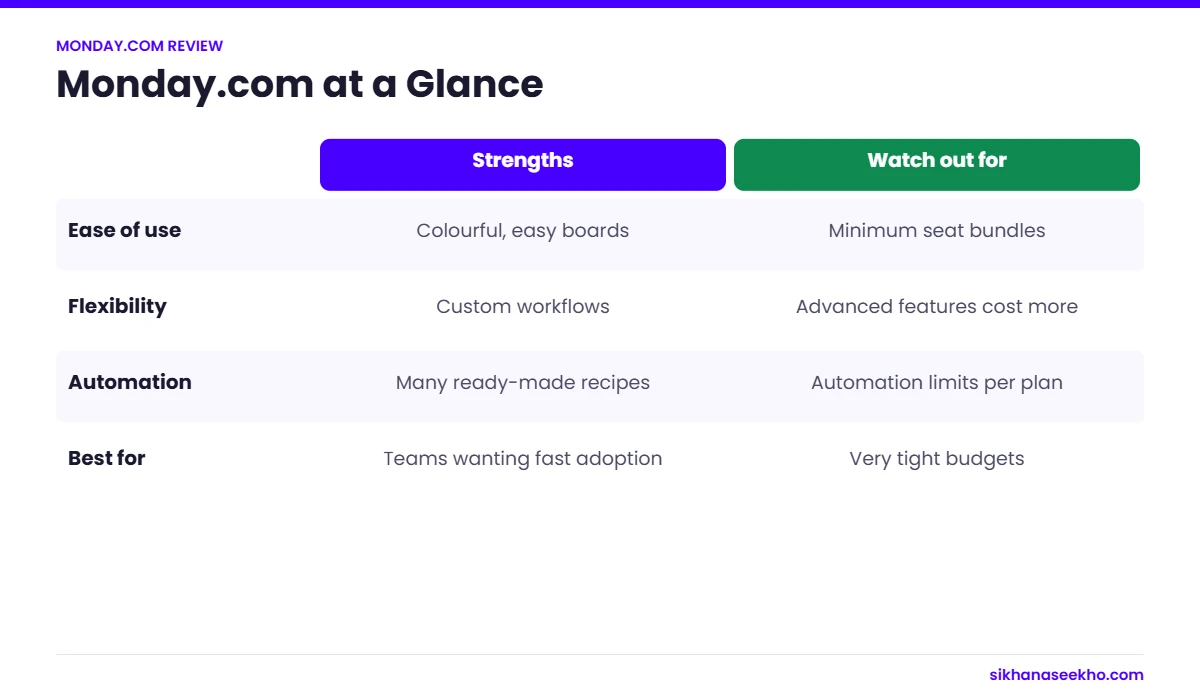
Unlike traditional PM tools built around task lists and Gantt charts, Monday.com is built around a flexible grid-board concept. Every board can be customised with different column types, views, automations and integrations. This makes it adaptable to almost any workflow, from software sprints to marketing campaigns to HR onboarding.
Monday.com now offers three distinct product lines. Monday Work Management is the core PM product covered in this review. Monday CRM handles sales pipeline management. Monday Dev covers Agile development as a Jira alternative. Each is sold separately.
Monday.com Pros and Cons
After 6 weeks of hands-on testing, here is my honest assessment of where Monday.com excels and where it falls short compared to the competition.
Monday.com Pricing 2026: All Plans Explained
Monday.com offers four plans for Work Management. All prices below are per seat per month, billed annually. Monthly billing is available at approximately 18% higher cost. Important: all paid plans have a 3-seat minimum.
- Unlimited boards
- 200+ templates
- 20+ column types
- iOS and Android apps
- No Gantt/Timeline
- No automations
- No integrations
- 5GB storage only
- Everything in Free
- Unlimited free viewers
- Unlimited items
- 5GB storage
- Priority support
- No Gantt/Timeline
- No automations
- 1 dashboard only
- Everything in Basic
- Timeline and Gantt view
- Calendar view
- 250 automations/mo
- 250 integrations/mo
- 5 dashboards
- 20GB storage
- Guest access
- Everything in Standard
- 25,000 automations/mo
- 25,000 integrations/mo
- Unlimited dashboards
- Time tracking
- Chart view
- Formula column
- 100GB storage
Enterprise Plan
Monday.com Enterprise is custom-priced based on team size and requirements. It adds enterprise-grade security (SSO, SAML, SCIM), advanced permissions and access controls, detailed audit logs, a 99.9% uptime SLA, a dedicated customer success manager, private boards and workspaces, and IP restrictions. For organisations with 50 plus users or strict security requirements, Enterprise is worth requesting a quote for directly.
Monday.com Key Features, Assessed
Boards and Views
The core of Monday.com is the board, a customisable grid where each row is a project item and each column is a data field. The range of available column types (70 plus) and view types is the most impressive in the category. You can switch the same board between Kanban, Gantt, Timeline, Calendar, Map, Workload and Chart views in one click, without re-entering any data. This flexibility is genuinely unmatched by Asana or Trello.
Automations
Monday's no-code automation builder is one of its strongest selling points. The "if-then" logic is easy to configure. "If status changes to Done, notify the owner and move the item to the Archive board." Pre-built automation recipes cover the most common needs. The Pro plan's 25,000 automations per month is genuinely sufficient for most teams. The Standard plan's 250 per month is a real constraint for active teams. You can hit that ceiling faster than you would expect.
Dashboards and Reporting
Monday's dashboards pull data from multiple boards into a single view. Perfect for portfolio-level project visibility. You can display workload by assignee, overdue items, budget tracking, sprint progress and custom KPIs. The widgets are clean and genuinely useful. The main limitation is that dashboards are capped at 1 on Basic and 5 on Standard. Pro unlocks unlimited dashboards, which is where real reporting value sits.
Integrations
250 plus native integrations plus Zapier and Make for everything else. The most valuable for PM workflows are Slack and Teams for notifications and updates, Jira for syncing issues both ways, Salesforce for CRM-to-project handoff, GitHub for linking commits to tasks, and Google Workspace or Microsoft 365 for file attachments and calendar sync. Integration action counts are capped per plan, the same cap as automations.
Monday AI
Available on Pro and Enterprise plans. Monday AI can generate task lists from a project brief, write item updates, summarise board activity and suggest automations. In testing it was useful for generating first-draft task lists from a paragraph description, reducing sprint planning preparation time noticeably. It is not as deep as dedicated AI PM tools but is a solid addition for Pro subscribers who use it.
| Feature | Free | Basic | Standard | Pro |
|---|---|---|---|---|
| Unlimited boards | ✓ | ✓ | ✓ | ✓ |
| Kanban view | ✓ | ✓ | ✓ | ✓ |
| Timeline / Gantt view | No | No | ✓ | ✓ |
| Calendar view | No | No | ✓ | ✓ |
| Chart / workload view | No | No | No | ✓ |
| Automations / month | No | No | 250 | 25,000 |
| Integrations / month | No | No | 250 | 25,000 |
| Dashboards | No | 1 | 5 | Unlimited |
| Time tracking | No | No | No | ✓ |
| Guest access | No | No | ✓ | ✓ |
| Monday AI | No | No | No | ✓ |
| Storage | 500MB | 5GB | 20GB | 100GB |
Who Is Monday.com Best For?
Monday.com is not the right tool for every team. Here is an honest breakdown of who will get the most value and who should look elsewhere.
- Marketing teams managing campaigns, content calendars and creative workflows
- Operations teams coordinating cross-departmental processes
- Project teams of 5 to 50 who need visual, flexible workflow management
- Client services or agency teams managing multiple client projects simultaneously
- Teams that need strong automations to reduce manual status updates
- Organisations wanting one tool for PM, CRM and HR workflows
- Non-technical teams who find Jira too complex
- A solo operator or 2-person team. The 3-seat minimum makes it expensive.
- A software development team running Scrum. Jira is better suited.
- Looking for a genuinely free tool with full features. The free plan is very limited.
- On a tight budget with a team under 5. ClickUp or Asana free tier may serve you better.
- Managing complex enterprise programmes with strict Waterfall governance. MS Project or Smartsheet fits better.
- Needing built-in time tracking without paying for Pro
Monday.com vs Asana vs ClickUp
The three most popular general-purpose PM tools compared head to head. All data reflects March 2026 pricing and feature sets.
| Factor | Monday.com | Asana | ClickUp |
|---|---|---|---|
| Starting price | $9/seat/mo (annual) | $10.99/seat/mo (annual) | $7/seat/mo (annual) |
| Free tier | 2 seats max | Up to 10 users | Unlimited users (100MB storage) |
| Seat minimum | 3 seats (paid plans) | No minimum | No minimum |
| Ease of use | Winner Most intuitive UI | Clean and structured | Feature-rich but steep learning curve |
| View types | Winner Gantt, Kanban, Calendar, Timeline, Map, Chart, Workload | Board, List, Timeline, Calendar | 15+ view types including Whiteboard |
| Automations | 250/mo (Standard), 25K (Pro) | Unlimited on Business and above only | Winner 1K/mo on free tier |
| Agile/Scrum features | Basic Kanban, limited sprint features | Timeline plus rules but limited Agile | Winner Sprints, story points, burndown |
| Reporting | Winner Cross-board dashboards on Pro | Good goal tracking, limited dashboards | Strong reporting on Business plan |
| Integrations | 250+ native | 200+ native | 1,000+ via ClickUp integrations |
| Customer support | 24/7 chat on all plans | Business hours only on lower plans | 24/7 on all plans |
| Best for | Marketing and Operations | Structured Task Teams | Feature-hungry Teams |
My Verdict on Monday.com
The Standard plan at $12 per seat per month is the sweet spot for most teams. It unlocks Gantt/Timeline view, automations, integrations and guest access. The Pro plan at $19 per seat is justified if you need unlimited dashboards, time tracking or Monday AI.
The main reason it does not score 5/5 is that the 3-seat minimum and the automation caps on lower plans are genuine constraints that competitors do not impose. A 2-person team or a team that runs high-volume automations on Standard will run into these walls quickly.
Bottom line: If your team has 5 or more people and needs visual workflow management that non-technical stakeholders can understand at a glance, Monday.com is the right choice. Start with the free trial to validate it fits your team's workflow before committing to an annual plan.