Asana Review 2026: Features, Pricing and Best Use Cases
A thorough, independent Asana review covering every pricing plan, what it genuinely does well, where it falls short, which team sizes and use cases it suits best, and how it stacks up against Monday.com and ClickUp in 2026.
Asana scores 4.3/5. It is the most structured and cleanest task management tool in the market with the best free plan for small teams. Best for: operations, marketing and IT teams of 3–50 who need clear task ownership and process-driven workflows. Not ideal for: teams needing deep visual flexibility (use Monday.com) or Agile dev teams (use Jira or ClickUp).
Sikhana Seekho Score
Independently assessed March 2026
What Is Asana?
Asana is a cloud-based project and task management platform founded in 2008 by Facebook co-founder Dustin Moskovitz and Justin Rosenstein. It went public on the NYSE in 2020 and now serves over 300,000 paying organisations across 190 countries. It is consistently one of the top three most-used PM tools globally alongside Monday.com and Jira.
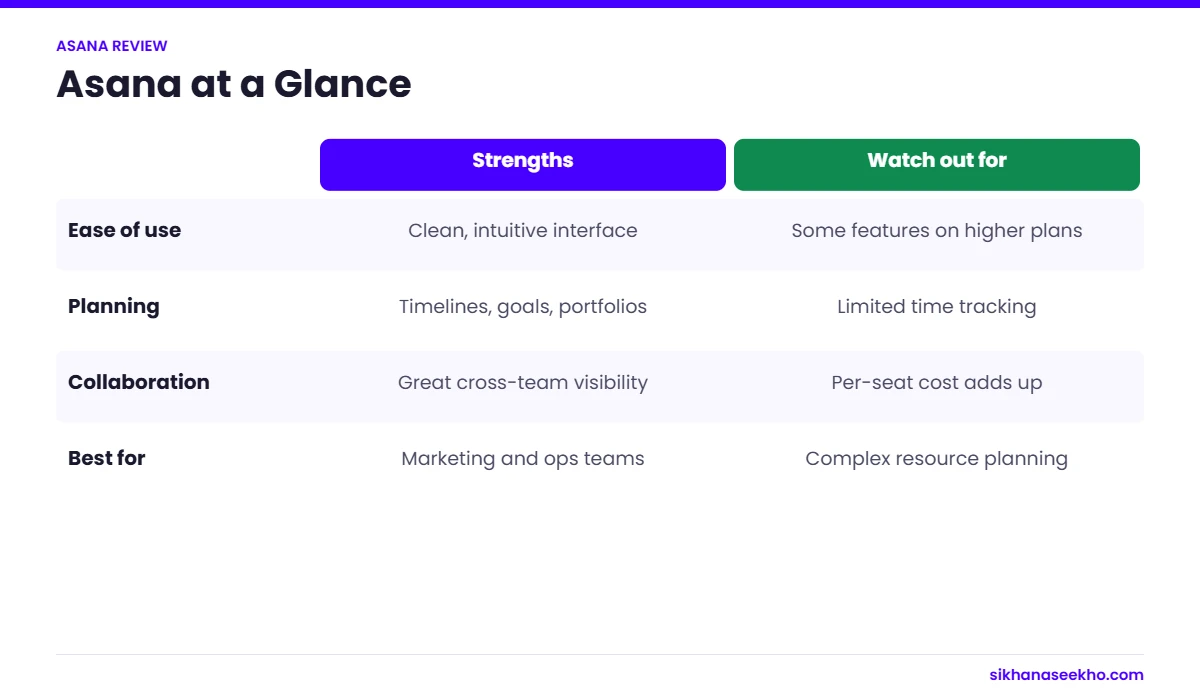
Unlike Monday.com's open grid approach, Asana is built around a structured task-and-project model. Every item has a clear owner, due date, status and project home. This structure is both Asana's greatest strength, onboarding is fast and confusion is rare, and its main constraint for teams needing highly customised, flexible workflows.
Asana positions itself as a "work management platform" rather than just a PM tool. Beyond task management, it now covers goal tracking (through Asana Goals), portfolio-level project management, workload balancing, and AI-powered workflow features through Asana Intelligence (available on Advanced and above).
Asana Pros & Cons
After 5 weeks of testing across multiple workflows and team types, here is our honest breakdown.
Asana Pricing 2026: All Plans Explained
Asana offers four plans. All prices below are per user per month billed annually. Monthly billing is available at approximately 20% higher cost. Unlike Monday.com, Asana has no seat minimum on any plan: a significant advantage for small teams and solo operators.
- Unlimited tasks & projects
- List, Board & Calendar views
- Basic integrations
- Mobile apps (iOS + Android)
- 200+ project templates
- No Timeline/Gantt
- No custom fields
- No automations
- Everything in Personal
- Timeline (Gantt) view
- Custom fields
- Task dependencies
- 250 automations/month
- Unlimited storage
- Admin controls
- 500 integrations
- Everything in Starter
- Portfolio management
- Workload view
- Advanced reporting
- 25,000 automations/mo
- Asana Intelligence (AI)
- Goal tracking (OKRs)
- Time tracking (built-in)
- Everything in Advanced
- SSO / SAML / SCIM
- Advanced security controls
- Audit logs
- Data residency options
- Dedicated CSM
- SLA guarantee
- Custom contracts
Asana Key Features: Assessed
Task & Project Structure
Asana's foundational structure is its biggest differentiator. Every task has exactly one owner, a clear due date, a status and a home project. Subtasks nest cleanly underneath parent tasks. Sections within a project act as swim lanes or phases. This structure eliminates the "who's doing what?" confusion that plagues less opinionated tools. In our testing, new team members understood how to add and update tasks within 15 minutes, the fastest onboarding of any tool we reviewed.
Timeline View (Gantt)
Asana's Timeline is one of the cleanest Gantt implementations available. Tasks appear as bars across a date range, and dependencies are shown as connecting lines. Critically, when you drag a predecessor task forward, Asana automatically shifts all dependent tasks, a feature that saves significant replanning time on dependency-heavy projects. Available from the Starter plan.
Automations
Asana's rule-based automation builder ("Rules") follows a trigger-action structure similar to Monday.com. Common rules: "When a task is marked complete, assign the next task to [person]", "When a due date passes with status not complete, notify the assignee." The Starter plan includes 250 automations per month: sufficient for most small team workflows. The Advanced plan at 25,000/month is required for high-volume or complex automation chains. Compared to Monday.com's automation builder, Asana's is slightly less intuitive for non-technical users.
Asana Goals & OKR Tracking
One of Asana's most distinctive features at the Advanced tier. Goals lets you create company, team and individual objectives and link specific Asana tasks and projects directly to them. As tasks complete, goal progress updates automatically. This is genuinely more sophisticated than anything Monday.com or ClickUp offers at the same price point, and gives PMs a clear line from daily task work to strategic business outcomes. Essential for organisations using OKRs.
Asana Intelligence (AI Features)
Available on Advanced and Enterprise plans. Asana Intelligence includes: Smart Fields (AI suggests relevant custom fields for new projects), Smart Summaries (generates project status summaries from activity), Smart Answers (natural language queries about your workspace data) and Smart Goals (goal-setting suggestions based on past project data). In testing, Smart Summaries were the most immediately useful: generating a usable project status update in under 10 seconds from board activity.
| Feature | Personal (Free) | Starter | Advanced |
|---|---|---|---|
| Unlimited tasks & projects | ✓ | ✓ | ✓ |
| List, Board & Calendar views | ✓ | ✓ | ✓ |
| Timeline (Gantt) view | : | ✓ | ✓ |
| Custom fields | : | ✓ | ✓ |
| Task dependencies | : | ✓ | ✓ |
| Automations / month | : | 250 | 25,000 |
| Portfolio management | : | : | ✓ |
| Workload view | : | : | ✓ |
| Goal tracking (OKRs) | : | : | ✓ |
| Asana Intelligence (AI) | : | : | ✓ |
| Advanced reporting | : | : | ✓ |
| Built-in time tracking | : | : | ✓ |
| Max users (free) | 10 users | Unlimited | Unlimited |
| Guest users | : | Count toward seats | Count toward seats |
Who Is Asana Best For?
Asana's structure and polish make it excellent for specific team types. Here is an honest breakdown of where it fits best and where you should look elsewhere.
- Small teams of up to 10 wanting a powerful free tool with clear task ownership
- Operations and HR teams managing recurring processes and checklists
- Marketing teams running campaign calendars and content pipelines
- IT teams managing helpdesk queues, change requests and system projects
- Organisations using OKRs who need to link daily work to strategic goals
- Teams transitioning from spreadsheets who need structure without complexity
- Project managers who prioritise clarity and accountability over visual flexibility
- A software development team running Scrum: ClickUp or Jira offer better sprint tooling
- Needing heavy visual customisation across boards: Monday.com has more view types
- Budget-constrained and needing advanced features: Advanced plan at $24.99/user is steep
- Running complex automations on a small budget: ClickUp offers more automations cheaper
- Managing large construction or engineering programmes: MS Project or Smartsheet
- Needing strong time tracking without a paid add-on
Asana vs Monday.com vs ClickUp
The three most widely used general-purpose PM tools compared directly. All data is current as of March 2026.
| Factor | Asana | Monday.com | ClickUp |
|---|---|---|---|
| Starting price | $10.99/user/mo (annual) | $9/seat/mo (annual) | $7/user/mo (annual) |
| Free plan | Winner Up to 10 users, unlimited tasks | 2 seats max only | Unlimited users, 100MB storage |
| Seat minimum | Winner No minimum on any plan | 3 seats on all paid plans | No minimum |
| Ease of use | Winner Cleanest UI, fastest onboarding | Highly intuitive, more flexible | Feature-rich but steeper curve |
| Visual flexibility | List, Board, Timeline, Calendar | Winner 7+ view types including Map, Chart | 15+ view types |
| Automations (mid plan) | 250/month (Starter) | 250/month (Standard) | Winner 1,000/month (Unlimited plan) |
| Goal / OKR tracking | Winner Built-in Asana Goals on Advanced | Limited goal features | Goals available on Business |
| Agile / Scrum features | Basic sprint support | Basic Kanban only | Winner Sprints, velocity, burndown charts |
| Portfolio management | Advanced plan ($24.99) | Winner Pro plan ($19) | Business plan ($12) |
| Free guest access | Guests count toward seats | Winner Free guest access on paid plans | Free guest access |
| Best for | Structured Task Teams | Visual Workflow Teams | Feature-hungry Teams |
Our Verdict on Asana
The Starter plan at $10.99/user/month unlocks Timeline view, custom fields, automations and unlimited storage, a genuine upgrade at a competitive price with no seat minimum. It is the right plan for most growing teams of 3–25 people.
The main weakness is the Advanced plan jump. Going from $10.99 to $24.99 per user is a 127% price increase, and it is the only way to access portfolio management, workload view, meaningful reporting and Asana Intelligence. At that price point, Monday.com Pro ($19/user) is a direct competitor worth comparing.
Bottom line: If your team values clarity, fast adoption and a generous free tier, start with Asana. For teams that need deep visual customisation, Monday.com will serve better. For Agile development teams, ClickUp or Jira are stronger choices.