Wrike Review 2026
Enterprise PM Worth the Price?
I spent four weeks testing Wrike across all five pricing tiers. This review covers every plan, what you actually get versus what you have to pay extra for, the genuine strengths that make Wrike the right choice for large teams, and the real limitations that make it wrong for everyone else.
What Is Wrike?
Wrike is a cloud-based project and work management platform built primarily for mid-to-large organisations managing complex, cross-functional work. Founded in 2006 and acquired by Citrix in 2019 (then Vista Equity Partners in 2021), Wrike now serves over 20,000 organisations globally including Nickelodeon, Hootsuite, and Syneos Health.
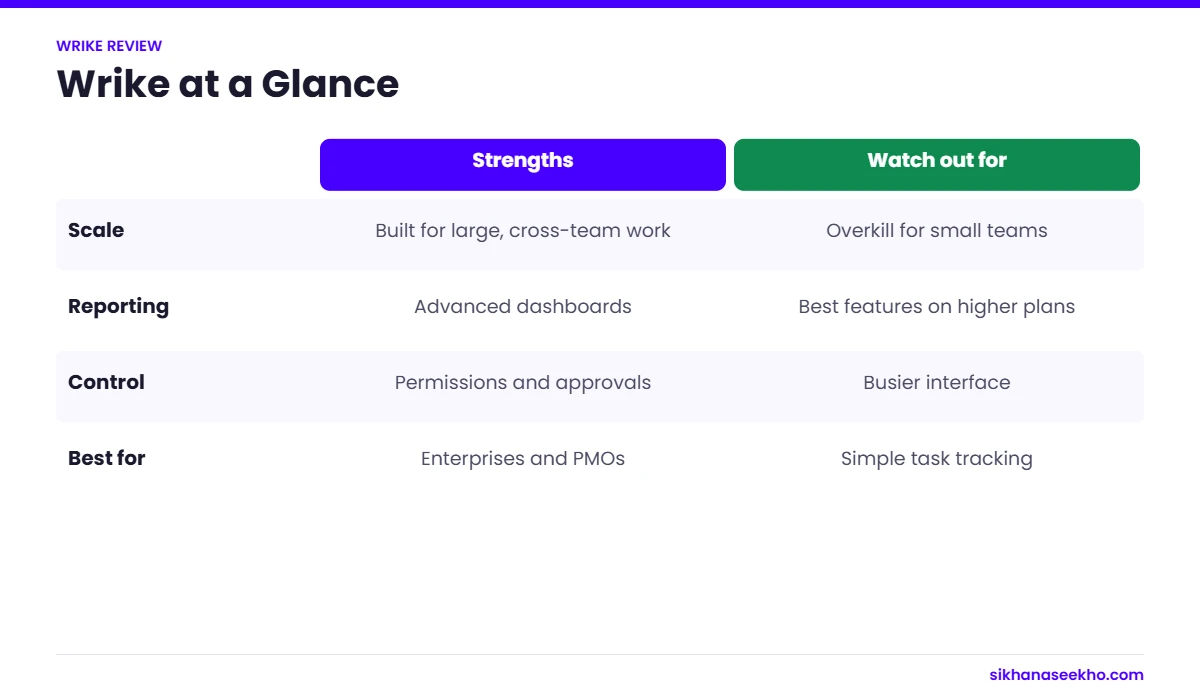
Unlike Monday.com or Asana, which market themselves to teams of all sizes, Wrike's architecture and feature set is fundamentally oriented toward enterprise use cases: portfolio management across multiple departments, advanced security controls, custom workflow automation at scale, and deep reporting that goes well beyond simple dashboards.
The platform supports multiple work views (list, board, Gantt, table, calendar, analytics), has over 400 native integrations, and ships a five-tier pricing structure ranging from a genuinely limited free plan to a custom-priced Apex tier designed for organisations with thousands of users.
Wrike Pricing 2026: All 5 Plans Explained
Wrike updated its pricing on 21 January 2026. There are five tiers. All prices are per user per month, billed annually. Business plans and above are annual-only, no monthly option. Wrike is sold in groups: up to 30 seats in groups of 5, 30 to 100 seats in groups of 10, 100 or more seats in groups of 25.
Enterprise, Pinnacle and Apex: Custom Pricing
Enterprise adds SAML SSO, two-factor authentication, custom access roles, advanced security policies and compliance controls. Storage increases to 10GB per user. Pricing is custom. Contact sales. Minimum seat count typically 20 or more.
Pinnacle adds advanced analytics, capacity planning, Performance Insights dashboards, Power BI and QuickBooks integrations, and 15GB storage per user. Best for organisations running complex multi-team programmes with budget management needs.
Apex, Wrike's newest and highest tier (launched January 2026), bundles add-ons that previously cost extra: Wrike Integrate (custom automations across 400+ apps), Wrike Lock (customer-managed encryption keys), two-way Jira/GitHub sync, and Wrike Datahub. Priced entirely by negotiation.
Wrike Features: What Actually Works Well
Portfolio and Programme Management
This is where Wrike genuinely outperforms its competitors. The portfolio view gives you a cross-project dashboard showing status, milestones, budget and resource allocation across every project in a programme in a single pane. You can drill down from programme to project to task without losing context. For PMOs managing 20 or more concurrent projects, this alone justifies the Business plan cost over Asana or Monday.com.
Gantt Charts and Dependency Management
Wrike's interactive Gantt charts are among the best in the market, available from the Team plan upwards. You can drag and drop to reschedule, add finish-to-start, start-to-start or finish-to-finish dependencies, and the chart automatically adjusts downstream tasks when upstream dates change. Critical path highlighting shows which tasks are blocking completion. The Gantt renders fast even on projects with 200 or more tasks, which cannot be said of every competitor.
Custom Fields and Workflows
Wrike's flexibility on custom fields is exceptional. You can create dropdown, numeric, text, formula, percentage and date fields, and surface them in any view. Combined with custom item types and dynamic request forms (Business and above), this lets you build a genuinely tailored PM system without developer involvement. The downside is that this same flexibility makes Wrike complex to configure. Expect significant setup time.
Resource Management
Resource management is available from Business upwards. You get workload charts showing hours allocated versus available per team member, time tracking and timesheets, and budget tracking against bill and cost rates. The workload view updates in real time as tasks are assigned or rescheduled, useful for preventing team burnout before it happens. This is notably better than Monday.com's resource features at an equivalent price point.
Reporting and Analytics
Wrike's reporting engine is a standout. You can build custom dashboards pulling data from across all projects, task status, time logged, budget consumed, milestone health, SLA compliance, and share them with stakeholders in read-only mode. The Pinnacle tier adds Power BI integration and Performance Insights, which provides predictive analytics and capacity forecasting. For organisations that live in exec reporting, this is genuinely valuable.
AI Features
Wrike added an AI writing assistant across all paid tiers and launched AI Agents in late 2025, which can auto-fill custom fields, process intake requests and scan task titles to suggest categorisation. As of March 2026, AI features are free to use. Wrike has signalled that quota-based pricing for AI will apply from April 2026 onwards. Worth testing now before costs are confirmed.
Wrike Pros and Cons: The Honest List
Who Should Use Wrike, and Who Shouldn't
Wrike vs Asana vs Monday.com vs ClickUp
All prices are per user per month on annual billing at the mid-tier paid plan, as of March 2026.
| Feature | Wrike Business | Asana Advanced | Monday.com Pro | ClickUp Business |
|---|---|---|---|---|
| Price / user / mo | $25 | $24.99 | $19 | $12 |
| Min seats (paid) | 5 | 2 | 3 | 1 |
| Gantt charts | ✓ Strong | ✓ Good | ✓ Good | ✓ Good |
| Portfolio management | ✓ Excellent | ✓ Good | ~ Basic | ~ Basic |
| Resource management | ✓ Strong | ✓ Good | ✓ Good | ~ Limited |
| Automation (mid tier) | 200 actions/mo | Unlimited | Unlimited | Unlimited |
| Custom fields | ✓ Extensive | ✓ Good | ✓ Good | ✓ Extensive |
| Reporting dashboards | ✓ Excellent | ~ Moderate | ~ Moderate | ~ Moderate |
| SSO / Enterprise security | Enterprise plan+ | Enterprise plan+ | Enterprise plan+ | Enterprise plan+ |
| Free plan | ~ 200 tasks only | ✓ Generous | ✗ Very limited | ✓ Generous |
| Best for | Large orgs, enterprise PM, complex portfolios | Small-mid teams, task clarity | Non-technical teams, visual workflow | Price-conscious teams, feature breadth |
The Honest Comparison Summary
Wrike vs Asana: Similar price at mid-tier but Wrike has stronger portfolio management, resource management and reporting. Asana has a better free plan, cleaner UI and is significantly easier to onboard. For teams under 15 people, Asana is usually the better choice. For PMOs managing complex multi-project programmes, Wrike wins. See our full Asana review.
Wrike vs Monday.com: Monday.com is cheaper ($19 versus $25), more visual, and easier for non-technical teams. Wrike has deeper project management features: better Gantt, better portfolio, better reporting. Monday.com wins on simplicity and UI. Wrike wins on PM depth. See our full Monday.com review.
Wrike vs ClickUp: ClickUp at $12/user offers extraordinary feature breadth at a low price. For budget-conscious teams that can handle configuration complexity, ClickUp competes well. Wrike's advantage is enterprise security, more polished UX at scale, and better vendor support for large deployments. See our full ClickUp review.
Is Wrike Worth It in 2026?
Wrike is worth the price for the organisations it is actually designed for. If you run a large marketing department, a professional services firm, a complex engineering programme, or a multi-team PMO, Wrike's portfolio views, resource management, advanced reporting and enterprise security justify the $25/user Business plan cost comfortably.
If you are a small or mid-size team under 15 people doing straightforward project management, Wrike is almost certainly not the right tool. The onboarding cost, configuration complexity and pricing make it a poor fit when ClickUp or Asana give you 80% of the functionality at half the price with a fraction of the setup effort.
Complex portfolios
Enterprise security
Budget-constrained
Need quick setup