ClickUp Review 2026 Most Features, But Worth It?
ClickUp promises to replace every other tool your team uses. It has more features than any competitor, the lowest price in the market and a genuinely powerful free tier. But is the complexity worth it, or will it slow your team down? My honest verdict after 6 weeks of testing.
ClickUp scores 4.2/5. It is the most feature-rich PM tool on the market and the best value for money, but its steep learning curve is a genuine obstacle for non-technical teams. Best for: technical teams, Agile developers, and power users who will invest time setting it up. Not ideal for: non-technical teams, fast-onboarding needs, or organisations that want simplicity over features.
Sikhana Seekho Score
Independently assessed March 2026
What Is ClickUp?
ClickUp is a cloud-based productivity platform founded in 2017 in San Diego. It has grown at an extraordinary pace, from zero to over 800,000 paying teams in seven years, driven primarily by its aggressive pricing, extreme feature breadth and a free tier that genuinely rivals paid plans at competitors.
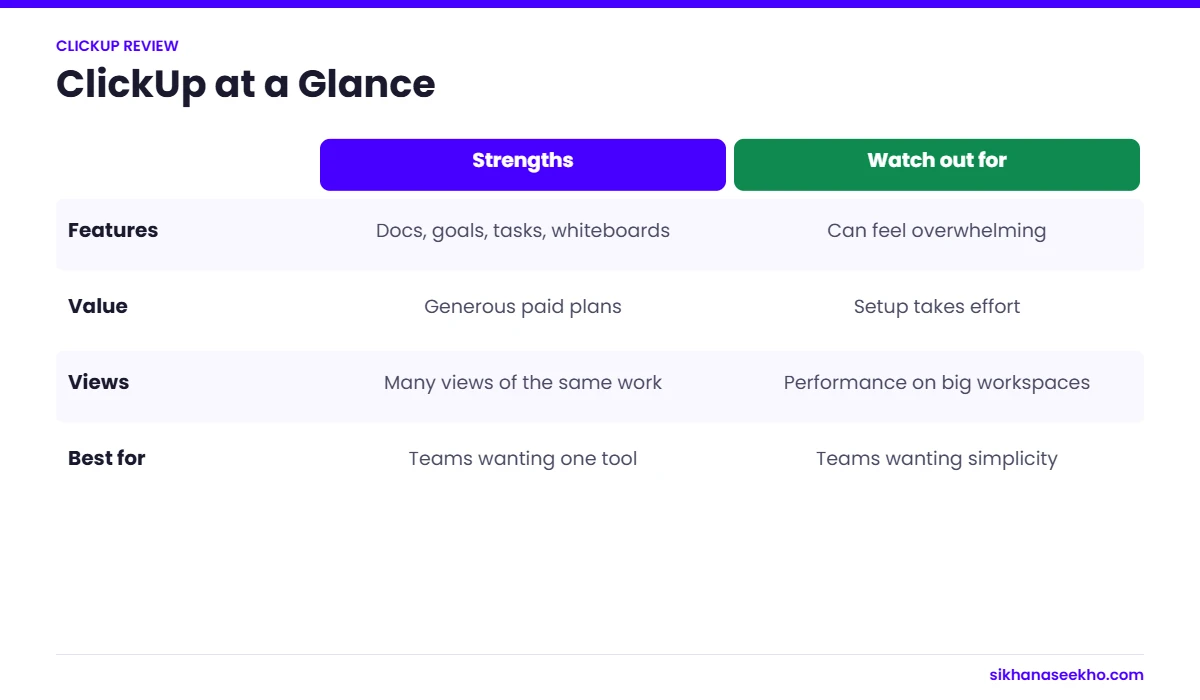
ClickUp's founding premise is blunt: your team uses too many tools and ClickUp can replace all of them. It bundles task management, docs, whiteboards, spreadsheets (ClickUp Tables), time tracking, goal tracking, Agile sprint management, AI, email integration and more into a single workspace. No other PM tool matches its feature count at any price point.
The catch, and it is a real one, is that this breadth creates significant complexity. ClickUp's hierarchy (Workspace to Space to Folder to List to Task to Subtask) and its seemingly limitless configuration options can overwhelm teams who simply want to track their projects without a week of setup.
ClickUp Pros and Cons
ClickUp's pros and cons are more polarised than any other tool I have reviewed. When it works for your team, it is transformative. When it does not, it adds friction to everything.
The Learning Curve: Honest Assessment
The learning curve is not a footnote in a ClickUp review. It is the central question. ClickUp is unambiguously the most powerful tool in the category. The question is whether your team has the capacity and motivation to unlock that power.
In my testing, the non-technical members of my test team found ClickUp's hierarchy (Workspace to Space to Folder to List to Task) confusing for the first two weeks. Questions like "where do I create a new task?", "which view should I use?" and "how do I find everything assigned to me?" came up repeatedly. By week four, the same team members were using it efficiently, but the investment of time and management attention during that ramp period is real.
ClickUp Pricing 2026: All Plans Explained
ClickUp is the most competitively priced major PM tool. All prices are per member per month billed annually. No seat minimum on any plan. Monthly billing costs approximately 45% more than annual.
- Unlimited tasks
- All 15+ view types
- Collaborative Docs
- Whiteboards
- 1,000 automations/mo
- 100MB storage only
- Limited dashboard widgets
- No advanced reporting
- Everything in Free
- Unlimited storage
- Unlimited integrations
- Gantt view
- Custom fields
- Goals and portfolios
- Resource management
- 1,000 automations/mo
- Everything in Unlimited
- Sprint management
- Advanced automations
- 10,000 automations/mo
- Custom exporting
- Advanced reporting
- ClickUp AI included
- 24/7 live support
- Everything in Business
- SSO / SAML / SCIM
- Unlimited automations
- Advanced permissions
- Dedicated success manager
- Custom contract and SLA
- MSA available
- White labelling
ClickUp Key Features, Assessed
Views: 15+ Options
ClickUp offers more view types than any other PM tool: List, Board (Kanban), Calendar, Timeline (Gantt), Gantt, Table, Workload, Mind Map, Map, Whiteboard, Chat, Activity, Doc, Form and Embed views. Each can be configured per List, not just per workspace, meaning different teams can use different views of the same underlying data. This is genuinely powerful for cross-functional teams with different workflow preferences. The downside: exposing all 15+ options to new team members at once is confusing.
Agile and Sprint Management
ClickUp's Agile tooling is the strongest of any general-purpose PM tool, offering Jira-competitive features at a fraction of the cost. Available on the Business plan: sprint management with automatic sprint creation, story point estimation, velocity tracking across sprints, burndown and burnup charts, backlog management and sprint retrospective templates. For software teams not requiring Jira's enterprise-scale integrations or established plugin ecosystem, ClickUp Business at $12/user is a compelling alternative.
ClickUp Docs
ClickUp Docs is a fully featured collaborative document editor built directly into the workspace. Documents can be linked to tasks, embedded in views and assigned to projects, creating genuine integration between documentation and delivery work. This eliminates the need for a separate Confluence or Notion subscription for most teams. Rich text, embeds, tables, code blocks and real-time collaboration are all included. In practice, the Docs feature is one of the most frequently cited reasons teams stay with ClickUp long-term.
Automations
ClickUp's automation builder supports over 100 triggers, conditions and actions. The free plan includes 1,000 automations per month, more than Monday.com's Standard plan ($12/seat) and equal to Asana's Starter plan. The Business plan at 10,000 per month handles even high-volume teams comfortably. Automation templates cover common PM scenarios: sprint transitions, status notifications, task assignments and due date adjustments. In testing, configuring complex multi-step automations required more technical understanding than Monday.com's simpler "if-then" builder.
ClickUp AI
ClickUp AI is included on the Business plan and covers AI writing assistance in Docs, task summarisation, action item extraction from meeting notes, project risk flagging and smart task creation from natural language. The AI summarisation of long comment threads was the most practically useful feature in my testing, condensing 40 plus comments into a 5-line summary that accurately captured the outstanding decisions. One of the stronger AI implementations in the PM tool category.
| Feature | Free | Unlimited | Business |
|---|---|---|---|
| All 15+ view types | ✓ | ✓ | ✓ |
| Unlimited tasks & members | ✓ | ✓ | ✓ |
| Storage | 100MB total | Unlimited | Unlimited |
| Gantt / Timeline view | ✓ | ✓ | ✓ |
| Custom fields | No | ✓ | ✓ |
| Automations / month | 1,000 | 1,000 | 10,000 |
| Sprint management | No | No | ✓ |
| Velocity and burndown | No | No | ✓ |
| ClickUp AI | No | No | ✓ |
| Advanced reporting | No | No | ✓ |
| Built-in Docs | ✓ | ✓ | ✓ |
| Whiteboards | ✓ | ✓ | ✓ |
| Time tracking | ✓ | ✓ | ✓ |
| 24/7 live support | No | No | ✓ |
Who Is ClickUp Best For?
ClickUp's power-user positioning means it genuinely excels for some teams and actively creates friction for others. Be honest with yourself about which category your team falls into before committing.
- Software development teams needing Agile sprint tools without paying Jira prices
- Technical teams comfortable with configuration and setup investment
- Budget-conscious organisations needing maximum features for minimum cost
- Teams that currently use 3 or more separate tools and want to consolidate (docs, PM, time tracking, goals)
- Power users and operations managers who will invest in ClickUp setup and optimisation
- Growing startups that need a tool that scales from 2 to 200 without changing platform
- Teams with dedicated admins who can own the ClickUp configuration and training
- A non-technical team prioritising fast adoption. Asana or Monday.com will onboard 3 times faster.
- A team with high member turnover. Re-onboarding new people into ClickUp repeatedly is costly.
- Running a simple project with basic needs. The setup overhead exceeds the value for small, short projects.
- An enterprise requiring guaranteed performance SLAs. ClickUp's occasional slowness at scale is a real risk.
- Primarily mobile-based workflow. ClickUp's mobile apps are noticeably weaker than competitors.
- A team that tried ClickUp before and quit. The problems are likely the same ones you hit before.
ClickUp vs Monday.com vs Asana
The three most popular general-purpose PM tools compared across the dimensions that matter most. All data reflects March 2026.
| Factor | ClickUp | Monday.com | Asana |
|---|---|---|---|
| Starting price | Winner $7/user/mo | $9/seat/mo (3 min) | $10.99/user/mo |
| Free plan | Winner Unlimited members, 1K automations/mo | 2 seats max | 10 users, unlimited tasks |
| Seat minimum | Winner None | 3 seats (paid) | None |
| Total view types | Winner 15+ views | 7 views | 4 views |
| Ease of use | Steepest curve. 4 to 6 weeks. | Very intuitive. 1 to 2 days. | Winner Fastest, under 1 day |
| Agile / Scrum | Winner Sprints, velocity, burndown | Basic Kanban only | Basic sprint support |
| Built-in Docs | Winner Full Docs editor on all plans | Basic updates only | Basic notes only |
| Built-in time tracking | Winner All plans including free | Pro plan only | Advanced plan only |
| Automations (mid plan) | 1,000/mo (Unlimited plan) | 250/mo (Standard plan) | 250/mo (Starter plan) |
| Visual dashboards | Functional but complex to build | Winner Most intuitive cross-board dashboards | Basic on Starter, better on Advanced |
| Best for | Technical and Agile Teams | Visual Workflow Teams | Structured Task Teams |
My Verdict on ClickUp
The Business plan at $12/user/month is where ClickUp's value is most apparent. It unlocks full sprint management, velocity tracking, burndown charts, advanced automations and ClickUp AI at the same price as Monday.com Standard, which includes none of those features. For Agile software teams this is the headline finding of this review.
The reason it scores 4.2/5 rather than higher is that the learning curve is a real cost. The weeks of reduced productivity during onboarding, the management attention required to configure the workspace, and the ongoing risk of team members using the tool inconsistently are genuine considerations. For non-technical teams, Asana or Monday.com will deliver faster value even at a higher price per user.
Bottom line: If your team is technical, motivated to invest in setup and wants maximum features for minimum cost, ClickUp is the right choice. Start with the free plan to validate your team's tolerance for complexity before committing to an annual Business subscription.