
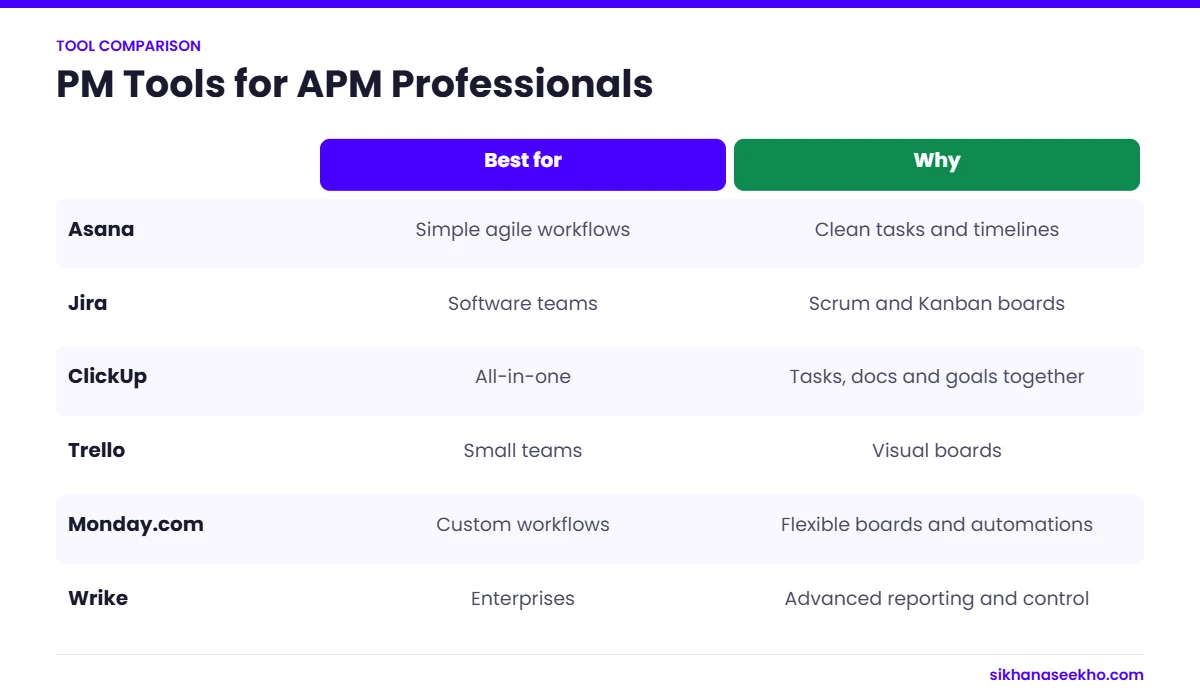
A project management tool is a type of software that helps teams plan tasks, track progress and collaborate in one place. For APM professionals in 2026, Asana suits simple planning, Jira suits software teams, ClickUp suits all-in-one needs and Trello suits small teams that like visual boards.
Compare the best project management tools and APM tools 2025 offers. Discover top features, pricing, and ideal fits for small teams and project managers. Project managers and agile teams understand that selecting the right tools is essential for project success. In 2025, the landscape of project management and APM tools has advanced, becoming increasingly collaborative, AI-enhanced, and adaptable. Whether overseeing a startup or coordinating a remote team, picking the right software is vital.
Let’s examine the leading project management and APM tools in 2025, assessing their features, pricing, and compatibility with various team requirements.
Project management tools at a glance
| Tool | Best for | Free plan? | Standout feature |
|---|---|---|---|
| Asana | Simple planning and cross-team work | Yes | Timeline and workload views |
| Jira | Software development teams | Yes | Scrum and Kanban boards with sprint reports |
| ClickUp | Teams wanting one tool for everything | Yes | Docs, tasks and goals together |
| Trello | Small teams and personal projects | Yes | Simple Kanban boards |
| Monday.com | Visual workflows for business teams | Limited | Automation and dashboards |
| Microsoft Project | Detailed schedules and Gantt charts | No | Critical path and resource levelling |
Free plans and prices change often. Check each vendor’s pricing page.
How do you choose the right tool for your team?
Start with the way your team works, not the feature list. Teams running sprints need backlogs and sprint reports; teams running fixed-scope projects need Gantt charts and dependencies.
Next, count the people who will use it daily. Small teams of 5 to 10 can live on free plans, while larger teams usually need paid tiers for permissions and reporting.
Finally, run a 2-week trial on a real piece of work. If people stop updating the tool after the first week, it is the wrong tool, however good the features are.
What does a tool roll-out look like?
Choosing a tool is the easy part. Getting 10 or 20 people to use it every day is where most roll-outs fail. A simple 4-week plan works for most small teams.
In week 1, set up 1 real project with its tasks, owners and dates, and agree the 3 or 4 statuses everyone will use. In week 2, move the team’s daily stand-up or weekly meeting into the tool, so updates happen there and not in email.
In week 3, add the reports or dashboards your sponsor needs, and stop producing the old spreadsheet version. In week 4, review what people actually use and remove anything nobody touches.
Keep the set-up simple. Teams that start with 20 custom fields usually abandon the tool; teams that start with 5 and add more when needed tend to stick with it.
Do APM qualifications require a specific tool?
No. APM qualifications such as the PMQ test your understanding of project management concepts, not any particular software. That means you can use whatever tool your employer prefers, and examples from any of them are fine in an exam answer.
What matters is that the tool supports the practices APM describes: a clear work breakdown, a schedule with dependencies, a risk log, change control and regular progress reporting. Most tools in this list can do all of these, though some need add-ons for detailed scheduling.
If you are studying for an APM qualification and have no tool at work, set up a free plan on one of these tools and use it to plan a small personal project. Building a schedule and risk log yourself is one of the fastest ways to make the theory stick.
Free vs paid plans: what do you actually get?
Free plans are usually enough for a small team running a handful of projects. They typically include task lists, boards, basic calendars and a limited number of users or projects.
Paid plans add the features larger teams and sponsors care about: timeline or Gantt views with dependencies, workload and resource views, automation rules, custom fields, reporting dashboards, guest access and admin controls for security.
A good rule is to start free, run 1 real project, and upgrade only when a missing feature is costing the team time every week. Most vendors let you trial paid features for 14 days, which is long enough to test them on live work.
Remember that the true cost is per user per month, so a tool that looks cheap for 5 people can become expensive for 50. Ask about non-profit and education discounts if they apply to you.
Which tool should you learn for your career?
If you work in software, learn Jira. If you work in business teams, Asana or Monday.com are common. For detailed schedules, Microsoft Project still appears in many construction and engineering job adverts.
1. Asana – Ideal for Simplicity and Agile Planning
Why Choose Asana:
Asana remains a preferred project management solution in 2025 for small teams in search of clarity and efficiency. Its intuitive interface and accessible dashboards simplify task tracking.
Key Features:
- Custom automation rules.
- Timeline and calendar views.
- Goal-setting and portfolio tracking.
Pricing:
Free for basic use; premium plans commence at $10.99/user/month.
Best For:
Small to mid-sized Agile or Kanban teams.
2. Jira – Top APM Tool for Software Development
Why Choose Jira:
Jira continues to lead as a powerful APM tool in 2025, particularly for development teams. Its seamless integration with DevOps pipelines stands out.
Key Features:
- Scrum and Kanban boards.
- Long-term planning roadmaps.
- Advanced bug tracking and release management.
Pricing:
Free for up to 10 users; Standard plans start at $7.75/user/month.
Best For:
Tech teams require customizable project management solutions.
3. ClickUp – Comprehensive Project Management Solution
Why Choose ClickUp:
ClickUp merges project planning, documentation, goals, and communication into one platform. In 2025, it boasts enhanced AI integration.
Key Features:
- Customizable views (List, Gantt, Mind Maps).
- Built-in time tracking.
- AI writing and planning functionalities.
Pricing:
Free plan available; paid plans begin at $7/user/month.
Best For:
Remote and hybrid teams needing an all-in-one solution.
4. Trello – Visual Ease for Smaller Teams
Why Choose Trello:
Trello continues to excel in 2025 as an easy-to-use project management tool tailored for visual thinkers, featuring a fun, card-based task tracking system.
Key Features:
- Drag-and-drop Kanban interface.
- Butler automation.
- Integration with apps like Slack and Google Drive.
Pricing:
Free plan available; Business Class from $10/user/month.
Best For:
Startups and creatives managing straightforward workflows.
5. Monday.com – Custom Workflows and Team Collaboration
Why Choose Monday.com:
Monday.com is known for its highly customizable boards and workflow automation, supporting diverse project styles from traditional Gantt charts to modern Agile methodologies.
Key Features:
- Visual dashboards.
- Time tracking and workload insights.
- Over 200 templates for various industries.
Pricing:
Free plan for 2 users; Standard plan starts at $10/user/month.
Best For:
Growing teams that require cross-functional collaboration.
6. Wrike – APM Tool with Enterprise-Grade Capabilities
Why Choose Wrike:
Wrike serves teams needing more than just basic task management. It provides sophisticated analytics, reporting, and resource management options, making it ideal for larger projects.
Key Features:
- Real-time activity streams.
- AI-driven risk predictions.
- Tools for workload balancing.
Pricing:
Free plan available; Team plan starts at $9.80/user/month.
Best For:
Enterprises and project managers tackling extensive programs.
In 2025, project management and APM tools transcend mere task handling. They facilitate strategic collaboration, automation, and valuable insights. Select a platform that matches your team’s size, style, and objectives. From the simplicity of Asana to the depth of Jira, there’s a solution for every workflow.
FAQs
1. What distinguishes APM tools from traditional project management tools?
APM (Agile Project Management) tools cater specifically to Agile methodologies like Scrum and Kanban, while traditional project management tools accommodate a wider range of approaches, including Waterfall and hybrid frameworks.
2. Are free project management tools available in 2025?
Indeed! Tools such as Trello, Asana, ClickUp, and Jira provide free plans with limited features that are suitable for smaller teams.
3. Which APM tool is best suited for software development teams?
Jira remains the leading choice, thanks to its extensive Agile capabilities, sprint tracking, and integrations with DevOps tools.
4. Can small businesses utilize enterprise-grade project management software?
They can, but it may be unnecessarily complex. Smaller teams often find simpler tools like Asana or Trello more manageable.
5. What features should be prioritized when selecting a project management tool?
Pay attention to collaboration capabilities, task tracking, timeline views, integrations with your existing tech stack, and cost-effective pricing.
Keep learning
- Top 10 APM PMQ Exam Tips to Pass First Time in 2026
- APM PMQ Qualification Guide for 2026
- Best PRINCE2 Online Courses 2026: Foundation and Practitioner Options Compared
- APM vs PMP (APM PMQ vs PMP): Which Is Better in 2026?
- PRINCE2 vs APM: Key Differences for UK Project Managers in 2026
- PRINCE2 Agile vs Traditional PRINCE2: Which Should You Learn in 2026?