Certifications PMP CertificationWorld’s top PM cert CSM — Certified ScrumMasterTop agile cert CAPMEntry-level PM cert PRINCE2UK & Europe standard View All Certifications ?
PM Guides Agile GuideComplete breakdown Scrum GuideRoles, ceremonies, artifacts EVM GuideAll formulas explained View All Guides ?
Career & Salary PM Salary 2026By country & level How to Become a PMStep-by-step roadmap 50 Interview QuestionsWith strong answers
PM Software Monday.com ReviewTop pick 2026 ClickUp ReviewBest value Best Free PM ToolsNo trials, truly free View All Software ?
Free Tools & Templates EVM CalculatorFree, no signup Gantt Chart MakerBuild & export free PMP Eligibility Checker30-second result Free PM Templates30 templates — Excel, Word, PDF
Get the Free PMP Guide ?
Software Comparison · Updated March 2026
📋
Asana
Asana, Inc. · From $0
vs
📌
Trello
Atlassian · From $0

Asana vs Trello 2026
Which Is Better for Your Team?

Both are excellent tools. The right one depends entirely on how you work. Trello is the fastest route to a working board. Asana is the better platform for managing real projects with dependencies, deadlines and stakeholder reporting. This comparison tells you exactly which one to use — and when to switch.

⚖️
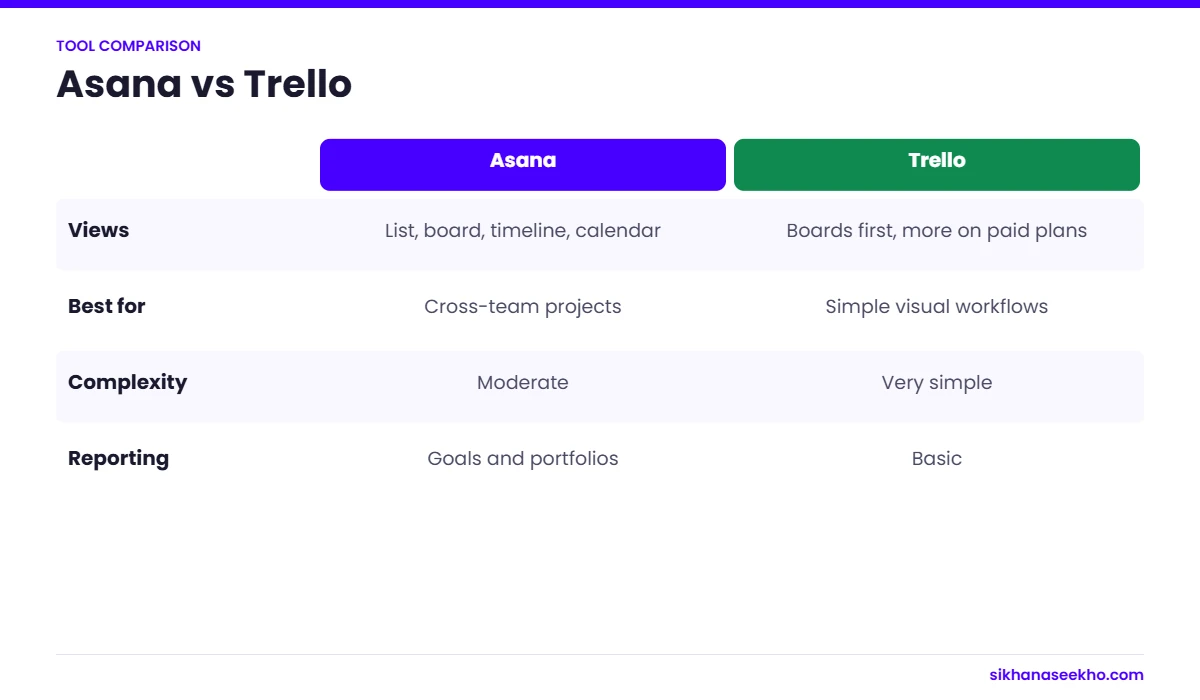
Quick verdict: Choose Trello for simple visual task tracking, small teams and minimal setup. Choose Asana for structured projects with dependencies, timeline views, cross-team coordination and stakeholder reporting. If you have outgrown Trello, Asana is almost always the right next step — not Monday.com or Notion.
01 — Overview

What Are Asana and Trello?

Both Asana and Trello help teams organise and track work. But they solve different problems at different scales. Understanding the fundamental philosophy behind each tool is more useful than comparing feature lists — because the right tool is the one that matches how your team actually works.
📋 Asana
Asana
Full project management platform
Multiple views: board, list, timeline, calendar, workload
Task dependencies and subtasks
Custom fields, forms and workflow rules
Portfolio and goals management
Reporting dashboards for stakeholders
Workload management across team members
Steeper learning curve
Free plan limited to 10 users
Paid plans are more expensive than Trello
Best for: Structured projects, multi-team coordination, formal PM
📌 Trello
Trello
Visual Kanban board tool
Exceptionally fast setup — boards in minutes
Intuitive drag-and-drop interface
Cards with checklists, attachments, due dates, comments
Power-Ups extend functionality (calendar, timeline etc.)
Generous free tier — unlimited cards
Owned by Atlassian — integrates with Jira, Confluence
No native Gantt at free tier
No task dependencies
Limited reporting and stakeholder views
Best for: Simple workflows, personal productivity, small teams
📌
Context: Trello was acquired by Atlassian in 2017. Asana remains independent. Both have significantly developed since 2020 — Trello added multiple board views (timeline, calendar, table) at paid tiers; Asana added AI features, better reporting and tighter integrations. The comparison below reflects current 2026 capabilities, not the older versions many teams remember.
02 — Features

Feature Comparison — Full Breakdown

The table below compares every significant feature category. ✓ = available natively, ✗ = not available, ⚡ = available but with limitations or only at paid tiers.

Feature📋 Asana📌 Trello
Kanban Board View All plans All plans — Trello's core
List / Table View All plans Premium only
Timeline / Gantt View Starter plan+ Premium only (basic)
Calendar View All plans Premium only
Task Dependencies Starter plan+ Not available natively
Subtasks All plans, unlimited levels Checklists only (no nesting)
Custom Fields Starter plan+ Limited at Standard tier
Workflow Automation (Rules) Starter plan+ (extensive) Basic Butler automation
Forms / Intake Starter plan+ Not available
Reporting Dashboards Advanced (Starter+) Basic (Premium)
Portfolio / Multi-project View Advanced plan+ Not available
Goals / OKRs Business plan+ Not available
Workload / Capacity View Advanced plan+ Not available
AI Features Asana AI (Starter+) Limited (Atlassian Intelligence)
Free Plan Usability 10 users, 10 projects Unlimited cards, 10 boards
Ease of Setup Moderate — learning curve Minutes to first board
Mobile App iOS + Android iOS + Android — excellent
Guest / External Access Limited guests on paid Guests supported on all plans
SSO / SCIM / Admin Business plan+ Enterprise only
03 — Pricing

Asana vs Trello Pricing — March 2026

Both tools offer free tiers that are genuinely useful for small teams. Asana's paid plans are more expensive than Trello's — but deliver substantially more capability for the price. For teams running real PM workflows, the Asana Starter plan at $10.99/user/month consistently delivers better ROI than Trello Premium at $10/user/month.

Asana Pricing
Personal (Free)
$0 / unlimited time
Up to 10 users. Unlimited tasks, projects, messages and activity log. List, board and calendar views. Basic reporting. No timeline, no dependencies, no custom fields.
Starter
$10.99 / user / month (annual)
Timeline (Gantt), task dependencies, custom fields, workflow rules, forms, advanced reporting, Asana AI. The minimum plan for real project management. Unlimited users.
Advanced
$24.99 / user / month (annual)
Portfolio management, workload view, goals, advanced integrations, priority support. For programme managers and PMO use cases.
Enterprise / Enterprise+
Custom pricing
SSO, SCIM, advanced security, dedicated CSM, custom branding, data residency.
Trello Pricing
Free
$0 / unlimited time
Unlimited cards, up to 10 boards per workspace, 1 Power-Up per board, 250 automation runs/month. Sufficient for most small team personal use.
Standard
$5 / user / month (annual)
Unlimited boards, unlimited Power-Ups, advanced checklists, custom fields, 1,000 automation runs/month. Good value entry point for growing teams.
Premium
$10 / user / month (annual)
Timeline, calendar, table and dashboard views. Unlimited automation. Workspace-level views for multiple boards. The first tier with real PM views.
Enterprise
From $17.50 / user / month
SSO, advanced admin controls, organisation-wide permissions. Minimum 25 users required.
💡
Price comparison at the same capability level: To get a Gantt/timeline view in Trello you need Premium ($10/user/month). Asana's timeline is included from Starter ($10.99/user/month) — but Asana Starter also includes dependencies, workflow automation, forms, Asana AI and advanced reporting. At roughly the same monthly cost per user, Asana Starter delivers substantially more project management capability than Trello Premium. The comparison only favours Trello on price if you genuinely only need a basic board.
04 — Views & Layouts

Views and Layouts — How You See Your Work

The biggest practical difference between the two tools is how you can visualise your projects. Trello's Kanban board is genuinely excellent — arguably the best implementation of any tool. But Asana lets you switch between six different views of the same project data without rebuilding anything.

Asana Views

Board view — Kanban columns, comparable to Trello's core experience. List view — spreadsheet-style task list with sortable columns and grouping; the most productive view for PMs managing large task counts. Timeline view — Gantt-style bar chart with dependency lines; shows the schedule visually with drag-and-drop rescheduling. Calendar view — tasks on a calendar by due date, useful for communicating deadlines visually. Workload view — shows how tasks are distributed across team members by date; the most useful view for managing capacity. Dashboard — customisable charts and status overview panels for stakeholder reporting without exporting to PowerPoint.

Trello Views

Board view (all plans) — Trello's core and strongest view. Arguably the most intuitive Kanban implementation available. Timeline view (Premium) — basic Gantt-style view added in 2021. Limited compared to Asana's timeline — no dependency visualisation at this tier. Calendar view (Premium) — cards by due date. Table view (Premium) — spreadsheet-style view of all cards across boards. Dashboard (Premium) — charts showing card counts by list, member and label. Map view (Premium) — cards with location data on a map; niche but useful for field teams.

📌
Trello's board is still the best Kanban board. Despite Asana adding board view, Trello's original Kanban implementation — visual, tactile, fast — remains more pleasurable to use for pure task status tracking. If your primary workflow is moving cards through stages and you do not need the other views, Trello's board experience is genuinely superior. The gap closes when you need to switch to a Gantt view mid-project without rebuilding your data.
05 — Integrations

Integrations — How Well Each Connects

Both tools integrate with the major workplace apps. The key difference is the depth of integration, particularly in the Microsoft and Atlassian ecosystems.

Asana Integrations

Asana integrates with 300+ tools natively. The most important for PM contexts: Slack (create tasks from Slack messages, receive Asana notifications in channels); Microsoft Teams (embed Asana tabs, create tasks from Teams messages); Google Workspace (attach Drive files, sync calendar events); Salesforce (link CRM records to delivery tasks); Zoom (create meeting notes as Asana tasks); GitHub/GitLab (link commits and PRs to tasks); Zapier (1,000+ further integrations). Asana's API is mature and well-documented — custom integrations are straightforward for development teams.

Trello Integrations

Trello's Power-Up system gives access to 200+ integrations. As an Atlassian product, its strongest integrations are within the Atlassian ecosystem: Jira (link Trello cards to Jira issues — the strongest use case for teams using both); Confluence (embed Trello boards in Confluence pages); Slack (notifications and card creation from Slack); Google Drive / Dropbox (file attachments); GitHub (PR and commit linking). The Power-Up system limits free users to one Power-Up per board — a significant constraint for teams wanting to use multiple integrations simultaneously.

📌
If you use Jira: Trello's native Atlassian integration makes it the natural companion tool for software teams using Jira for engineering work and Trello for adjacent non-engineering project tracking. If your engineering team is on Jira and you need a simple task board for the business side, Trello's Jira integration is a compelling reason to stay in the Atlassian ecosystem rather than adding Asana.
06 — Category Winners

Who Wins Each Category

📋 Asana Wins
Choose Asana when you need…
Task dependencies and critical path visibility
Multiple views of the same project data
Workflow automation and intake forms
Portfolio management across multiple projects
Workload visibility and capacity planning
Stakeholder reporting dashboards
Cross-team coordination with 10+ people
Scalable structure as the team grows
📌 Trello Wins
Choose Trello when you need…
The fastest possible setup (minutes, not hours)
The most intuitive Kanban board experience
A free tool that genuinely stays free for small teams
Simple visual workflow tracking without complexity
Integration with Jira in an Atlassian ecosystem
Personal task management and to-do organisation
Teams resistant to learning new software
Light-touch project coordination with external guests

Where They Are Equal

Mobile apps — both have excellent iOS and Android apps with full functionality. Trello's mobile experience is slightly more polished; Asana's is more complete. Notifications and collaboration — both handle task comments, @mentions, file attachments and email notifications well. Security — both offer SOC 2 Type II compliance, 2FA and SSO at paid enterprise tiers. Reliability — both have strong uptime records with 99.9%+ SLA on paid plans.

07 — Verdict

Clear Verdict — By Team Type and Use Case

The answer to "Asana or Trello?" is almost always determined by team size, project complexity and whether you need formal PM features. Use this table for a direct verdict.

Team / Use CaseVerdictReason
Solo professional / personal tasksTrelloFree, fast, no over-engineering needed. Trello's free tier is hard to beat for personal task management.
Small team (2–5 people), simple workflowsTrelloFree tier handles this perfectly. No need to pay for either tool at this scale and simplicity.
Small team outgrowing Trello freeAsanaAsana Starter ($10.99/user) unlocks substantially more PM capability than Trello Premium ($10/user) at a similar price.
10–50 person team, mixed projectsAsanaAsana's portfolio views, workload management and cross-project reporting justify the price. Trello's architecture doesn't scale cleanly to this use case.
Software / engineering team using JiraTrelloTrello's native Jira integration makes it the natural business-side companion tool. Keep Jira for engineering; use Trello for everything else in the Atlassian ecosystem.
Project manager running formal PMAsanaTimeline, dependencies, custom fields, forms and reporting dashboards are all needed for formal PM. Trello cannot provide these without heavy Power-Up workarounds.
Marketing / creative teamEitherTrello works for campaign task tracking. Asana adds value when campaigns have complex dependencies and tight deadlines across multiple stakeholders.
Cross-functional programme teamAsanaPortfolio management, workload views and advanced reporting are essential for programme oversight. Trello has no meaningful answer to these requirements.
PMO needing portfolio visibilityAsanaAsana Advanced plan provides portfolio management, goals and workload views. Trello has no portfolio capability regardless of plan.
Remote-first team needing simplicityTrelloTrello's visual simplicity makes async collaboration intuitive without training. Less to go wrong in a remote context with mixed technical capability.
Team considering switching from Trello to AsanaAsanaIf you are hitting Trello's limits, Asana is the most natural migration destination. Asana has a Trello import tool that preserves your board structure, lists and cards.

Migrating from Trello to Asana

1
Use Asana's native Trello import
Asana has a built-in Trello importer — go to Create Project → Import → Trello. It transfers boards as projects, lists as sections and cards as tasks, preserving labels, due dates, members and descriptions. Attachments are linked but not transferred.
2
Rebuild your workflow in Asana's structure before migrating users
Set up your Asana workspace — teams, projects, custom fields and templates — before inviting the full team. A migration where users arrive to a half-configured workspace causes more disruption than the switch itself.
3
Run both tools in parallel for 2–4 weeks
Keep Trello read-only for reference while new tasks are created in Asana. Most teams need 2–4 weeks to develop an Asana habit. A hard cutover on day one typically results in people reverting to Trello.
4
Invest an hour in Asana Academy
Asana Academy provides free structured onboarding courses (30–60 minutes total) that significantly reduce the learning curve. Teams that skip onboarding consistently underuse Asana's features and recreate Trello-like simple boards inside a more powerful tool — getting neither the simplicity of Trello nor the capability of Asana.
08 — FAQ

Asana vs Trello — FAQ

Asana is more powerful — it supports multiple views (board, list, timeline, calendar, workload), task dependencies, custom fields, workflow automation, forms and portfolio management. Trello is simpler, faster to set up and free for most small team uses. Asana is better for teams managing structured projects with dependencies, deadlines and stakeholder reporting. Trello is better for teams needing a visual task board with minimal setup. For teams of more than 10 people running real projects, Asana consistently outperforms Trello. For personal task management and simple team boards, Trello is often the better choice.
Yes — Trello's free tier includes unlimited cards, up to 10 boards per workspace, one Power-Up per board and 250 automation runs per month. For most small teams running simple projects, the free tier is genuinely sufficient. Trello Standard ($5/user/month) adds unlimited boards. Trello Premium ($10/user/month) adds timeline, calendar, table and dashboard views — this is the minimum tier needed for any project management work beyond simple Kanban. The free tier is more generous than Asana's (which limits to 10 users and 10 projects).
Yes — Trello works for simple project management, particularly visual workflow tracking. Its Kanban board is excellent for moving tasks through stages. Its limitations for formal PM are: no native Gantt without Premium, no task dependencies, no portfolio view and limited reporting. For a coordinator managing a single straightforward project with a small team, Trello is a solid free option. For a PM managing complex multi-workstream delivery with dependencies and stakeholder governance, Asana or a more capable tool (Microsoft Project, Jira, Monday.com) is needed.
The core difference is scope and complexity. Trello is a Kanban board tool — excellent at visual task tracking, simple and intuitive. Asana is a full project management platform supporting Kanban, list, timeline, calendar, workload, portfolio and goals. At the same price point (Premium tier), Asana delivers substantially more PM capability. Both are used for task and project management, but they serve different levels of project complexity. Trello suits simple workflows; Asana suits structured projects with formal governance requirements.