Certifications PMP CertificationWorld’s top PM cert CSM — Certified ScrumMasterTop agile cert CAPMEntry-level PM cert PRINCE2UK & Europe standard View All Certifications ?
PM Guides Agile GuideComplete breakdown Scrum GuideRoles, ceremonies, artifacts EVM GuideAll formulas explained View All Guides ?
Career & Salary PM Salary 2026By country & level How to Become a PMStep-by-step roadmap 50 Interview QuestionsWith strong answers
PM Software Monday.com ReviewTop pick 2026 ClickUp ReviewBest value Best Free PM ToolsNo trials, truly free View All Software ?
Free Tools & Templates EVM CalculatorFree, no signup Gantt Chart MakerBuild & export free PMP Eligibility Checker30-second result Free PM Templates30 templates — Excel, Word, PDF
Get the Free PMP Guide ?
Software Review · Updated March 2026

Jira Review 2026
Still the Best for Software Teams?

Jira remains the dominant issue tracking and agile delivery platform for software teams — but Atlassian's pricing changes, the rise of Linear and the bloat of added features have given teams more reasons to question it than ever. This review covers what has changed, what it actually costs, where it genuinely excels and the honest frustrations that make teams consider alternatives.

Syed Mujeeb Rehman, PMP
📅 Updated March 2026
14 min read
🔍 Independently reviewed
4.2/5
Overall Score
Agile Features
4.6
Integrations
4.5
Ease of Use
2.7
Reporting
4.1
Value for Money
3.5
Customisation
4.4
01 — What Changed

What Has Changed in Jira — 2025 to 2026

Jira has changed more in the past 18 months than in the preceding five years. Atlassian's migration of all customers from Jira Software to a unified "Jira" platform, the introduction of AI features across the product, and significant pricing restructuring have all hit simultaneously. Here is what matters for teams evaluating or re-evaluating Jira in 2026.
🔀
2025 Q2 — Major
Jira Software + Jira Work Management merged into a single "Jira"
Atlassian unified its two separate Jira products into one platform. Existing Jira Software customers were migrated automatically. The merged product includes business team templates (project management, marketing, HR) alongside the original software development workflows. This makes Jira more accessible to non-dev teams — but also makes the interface more complex for dev teams who just want sprint boards and backlogs.
💰
2025 Q3 — Significant
Pricing restructure — free plan limit reduced, Premium repriced
The free plan cap remained at 10 users but several features were moved from Free to Standard. Standard pricing moved to $8.15/user/month (previously $7.75). Premium repriced to $16/user/month. More critically, Atlassian moved JSM (Jira Service Management) bundling — previously separate — into combined licensing for enterprise customers, changing the cost calculus for organisations using both products.
🤖
2025 Q4 — New
Atlassian Intelligence (AI) rolled out across Jira
Atlassian Intelligence is now available on Premium and Enterprise plans. Key features: AI-generated issue summaries, automated sprint planning suggestions, natural language issue search ("show me all critical bugs assigned to my team this sprint"), JQL query generation from plain text descriptions, and auto-generated child issue creation from epics. The JQL natural language feature is the most immediately useful for non-technical users who previously needed to learn Jira Query Language manually.
📊
2026 Q1 — Improved
Dashboards and reporting rebuilt — new chart types and cross-project views
Jira's long-criticised dashboard and reporting interface received a significant rebuild. New chart types (cumulative flow, deployment frequency, lead time distribution) now available natively without third-party add-ons. Cross-project dashboards allow portfolio-level reporting across multiple boards for the first time without requiring Jira Align (the enterprise add-on). This addresses one of the most consistent criticisms from programme managers using Jira.
⚠️
Ongoing — Watch
Atlassian shutting down Server edition — all on Cloud by 2026 end
Atlassian's Server end-of-life (February 2024) has forced all on-premise Jira Server customers to migrate to either Jira Cloud or Jira Data Center. Many enterprise customers who had been running Jira Server for years found the Cloud migration more disruptive and expensive than expected — particularly around custom integrations, private app data and compliance requirements. Data Center pricing is significantly higher than Server was. For organisations still mid-migration, this is the most pressing Jira news in 2026.
02 — Features

Core Features — Scored and Reviewed

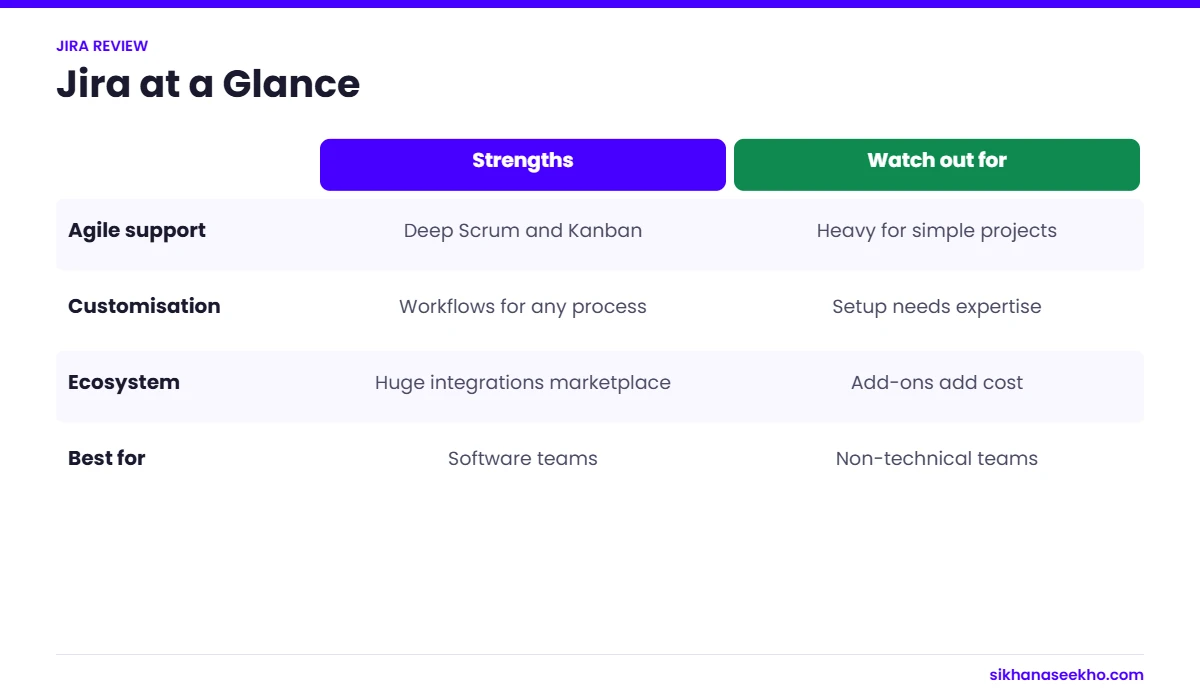
Jira's strength is depth in specific areas — particularly sprint management, issue tracking and integrations. Its weakness is a consistently unintuitive interface that requires significant setup time and ongoing admin before a team can use it productively.

Agile Core
Sprint & Scrum Management
4.6
Jira's sprint board, backlog management, velocity charts, burndown charts, sprint planning and sprint review tooling remain best-in-class. The sprint board visualises in-progress work clearly; the backlog gives product owners the refinement and prioritisation tooling they need. No other mainstream PM tool comes close to this for pure Scrum workflow management.
Issue Tracking
Issue Types & Workflow
4.5
Configurable issue types (Epic, Story, Task, Sub-task, Bug, Spike), custom workflows with defined transitions and statuses, and screen schemes that control what fields appear for each issue type. This configurability is what makes Jira powerful for complex software teams — and overwhelming for simple ones. The custom workflow builder is genuinely excellent once you know how to use it.
Integrations
Dev Tool Integrations
4.5
Native integrations with GitHub, GitLab, Bitbucket (first-party), Jenkins, CircleCI, AWS DevOps, Azure DevOps pipelines, Slack, Microsoft Teams, Confluence and 5,000+ marketplace apps. Commit-to-issue linking, branch visibility on Jira cards and deployment frequency tracking make Jira the best-connected tool in the dev toolchain. The GitHub and Bitbucket integrations are first-class; third-party integrations vary in quality.
Reporting
Charts & Dashboards
4.1
Rebuilt in 2026 with new chart types and cross-project views. Velocity charts, burndown, cumulative flow, sprint reports and release burndown now available natively. The new dashboard builder is significantly better than the previous version. Still weaker than Monday.com for visual stakeholder reporting — but now adequate for most PM use cases without third-party add-ons.
Customisation
Workflows & Screens
4.4
Custom workflows, custom fields, custom screens, custom issue types, custom notification schemes and custom permission schemes. Jira can be configured to mirror almost any development process with enough admin investment. The power is real — but so is the overhead. A misconfigured Jira instance is arguably worse than no Jira at all, which is why Jira admin has become a specialist career in its own right.
Ease of Use
Onboarding & UX
2.7
Jira's most consistent criticism — and still justified in 2026. New users require 1–2 weeks to become independently productive. The navigation between projects, boards, backlogs and issue views is non-obvious. The settings architecture is notoriously deep (project settings vs global settings vs scheme associations). Atlassian has improved onboarding templates but the fundamental UX complexity remains. The 2026 UI refresh helped the visual design but did not address structural navigation issues.
Roadmaps
Advanced Roadmaps / Plans
4.0
Basic roadmaps are available on all plans (epics displayed on a timeline). Advanced Roadmaps (now renamed "Plans") is available on Premium — it allows cross-project planning, dependency visualisation, team capacity planning and scenario modelling. Plans is genuinely powerful for programme managers coordinating across multiple development teams. The free-tier roadmap is useful for single-team sprint sequencing but limited for multi-team portfolio planning.
AI Features
Atlassian Intelligence
3.8
Available on Premium and Enterprise. Genuinely useful features: natural language JQL queries (type plain English, get JQL — removes the biggest barrier for non-technical users), issue summarisation for long ticket threads, auto-generated sub-tasks from epics. Less useful: AI sprint planning suggestions are generic and often miss context. Overall: a meaningful improvement to daily usability for non-technical stakeholders, less transformative for experienced Jira users who already know JQL.
03 — Pricing

Jira Pricing — What It Actually Costs in 2026

Jira's headline pricing looks competitive — $0 for small teams, $8.15/user for Standard. The real cost becomes apparent when you factor in the add-ons most teams discover they need, the Confluence cost for documentation, and the dramatic difference between Cloud and Data Center pricing.

Free
Free
$0 / up to 10 users
Unlimited projects
Scrum & Kanban boards
Backlog management
Basic roadmaps
2GB file storage
Community support only
Standard
Standard
$8.15/user/month
Everything in Free
Advanced permissions
Audit and access logs
250GB file storage
Business hours support
User management tools
⭐ Recommended
Premium
$16/user/month
Advanced Roadmaps (Plans)
Atlassian Intelligence (AI)
Unlimited storage
Sandbox environment
99.9% uptime SLA
24/7 priority support
Enterprise
Enterprise
Custom / annual contract
Multiple instances
SAML/SSO centrally managed
IP allowlisting
Data residency control
Dedicated CSM
Jira Align available

The Real Cost — What Most Teams Pay

10-person dev team on Premium: $160/month ($1,920/year). Add Confluence Standard ($5.16/user/month) for documentation: +$51.60/month. Total: ~$212/month for the core Atlassian stack. For 20 people this doubles to ~$424/month. These are real costs that many organisations underestimate at evaluation stage when comparing to "free" Notion or Trello.

Data Center pricing (for on-premise compliance requirements): Starts at $38,000/year for 500 users — dramatically more expensive than Cloud and the reason many organisations that previously ran Jira Server are reconsidering their stack as they migrate off end-of-life Server.

⚠️
Watch for add-on costs. Many features that teams expect to be native require paid Marketplace apps. Common hidden costs: Zephyr Scale or Xray for test management ($30–$50/month for 10 users), Structure for advanced board management, portfolio add-ons pre-2026 refresh, and Tempo Timesheets for time tracking. The Atlassian Marketplace is extensive — but the free tier of any add-on is almost always too limited for production use. Budget for at least one or two add-ons when calculating Jira's true cost.
04 — Pros & Cons

Jira Pros and Cons — Honest Assessment

✅ What Jira Does Well
Best-in-class Scrum board and backlog management — nothing competes for pure Agile software delivery
Deepest dev tool integration ecosystem — GitHub, GitLab, Bitbucket, Jenkins, CircleCI and 5,000+ Marketplace apps
Highly configurable — can be shaped to match almost any development workflow or process
Advanced Roadmaps (Plans) is genuinely powerful for programme managers coordinating across multiple teams
Free plan is genuinely usable for small teams (up to 10 users) — not a crippled trial
JQL (Jira Query Language) enables precise, powerful filtering that no other tool's search can match
2026 dashboard rebuild significantly improved native reporting — fewer third-party add-ons needed
AI natural language JQL removes the steepest learning curve for non-technical users
Industry standard — most software developers and engineering PMs already know it
✗ Where Jira Falls Short
Consistently the most complex tool to set up and administrate in its category — Jira admin is a specialist role
New user onboarding is genuinely painful — 1–2 weeks to independent productivity
Navigation between projects, boards and settings is non-obvious even for experienced users
Add-on dependency — test management, time tracking and some reporting features require paid Marketplace apps
Server end-of-life migration disruption — many organisations still managing painful Cloud or Data Center transitions
Data Center pricing is significantly higher than comparable Cloud tools for on-premise requirements
Non-software teams consistently struggle — business team templates have improved but the UX is still built for developers
Mobile app is functional but noticeably worse than the desktop experience
Overkill for teams of under 5 who need simple task management
05 — Real Frustrations

The Biggest Jira Frustrations — What Teams Actually Complain About

These are the recurring complaints that appear consistently in community forums, Reddit threads and direct user feedback — not theoretical weaknesses but real, daily pain points that teams deal with in practice.

1. The Settings Architecture Is a Maze

Jira has three overlapping settings layers: global administration settings, project-level settings and scheme associations (permission schemes, workflow schemes, screen schemes, notification schemes, issue type schemes). When something behaves unexpectedly — a status missing, a field not appearing, a transition blocked — diagnosing the cause requires understanding which layer is relevant and how the schemes are associated. Most developers find this acceptable once learned. Product managers, business analysts and stakeholder users find it incomprehensible. The 2026 UI refresh tidied the navigation but did not simplify the underlying architecture.

2. JQL Has No Business Being a Requirement for Basic Filtering

Jira Query Language is powerful — "assignee = currentUser() AND sprint in openSprints() AND status != Done ORDER BY priority DESC" retrieves exactly what you need. But the requirement to learn JQL just to find your own open tasks in a sprint is a legitimate barrier. The 2026 AI natural language JQL feature helps — you can now type "my open bugs in the current sprint" and get JQL generated automatically — but the fallback for non-AI plan users is still a command line disguised as a search box.

3. The Board and Backlog Are Separate Views for No Good Reason

Scrum teams switch constantly between the backlog view (for sprint planning, refinement and prioritisation) and the board view (for tracking sprint work in progress). These are two different screens with different navigation paths rather than a single unified view. Teams that work primarily in the backlog during planning weeks and primarily in the board during sprint weeks find themselves clicking back and forth more than necessary. This is a structural design choice that Atlassian has not changed despite years of user requests.

4. Notification Volume Is Out of Control at Default Settings

Default Jira notification settings send email alerts for every comment, status change, assignment and mention on every issue a user has ever interacted with. New teams who do not configure notification schemes on day one find their inboxes unmanageable within a week. The solution (configuring notification schemes) requires admin access and awareness that the problem exists — neither of which new teams typically have at setup. This is a first-week experience failure that creates lasting negative impressions of the product.

5. Performance on Large Instances

Jira Cloud performance on large projects (500+ issues per board, 50+ team members) has improved significantly since 2023 but remains a complaint point. Board loading times of 3–6 seconds on complex boards, slow JQL query responses on large datasets and occasional dashboard rendering delays are reported by teams on Standard plans. Premium plan users with the enhanced infrastructure consistently report better performance — but it should not require a premium tier to load a sprint board in under 2 seconds.

💡
The honest take: Most of these frustrations are well-known, years-old and documented in Atlassian's own community forums — many with thousands of upvotes and "Future Consideration" status going back to 2018. Atlassian has addressed some and ignored others. Teams that adopt Jira should do so with clear eyes: you are getting the most powerful Agile delivery tool available, with a UX complexity that is real and unlikely to disappear entirely. The question is whether the power justifies the overhead for your team's specific situation.
06 — Who Should Use Jira

Who Should Use Jira — By Team Type

💻
Use Case
Software Development Teams
✅ Strong Yes
Jira is purpose-built for software development. Sprint management, backlog grooming, bug tracking, release management and dev tool integrations are all best-in-class. If your team runs Scrum or Kanban for software delivery, Jira is the correct default choice and the tool your developers are most likely to already know.
📦
Use Case
Product Management Teams
✅ Yes — with caveats
Product managers embedded in engineering organisations get strong value from Jira — roadmaps, epic management, story mapping and release tracking all serve PM workflows. The caveat: PMs who are not technically comfortable will struggle with Jira administration. The 2026 AI features help non-technical PMs considerably with JQL and issue creation.
🏛️
Use Case
Programme Managers (Multi-Team)
⚡ Yes — on Premium
Advanced Roadmaps (Plans) on Premium provides cross-project planning, team capacity view, dependency management and scenario planning. This makes Jira a viable programme management tool at Premium tier for organisations already in the Atlassian ecosystem. The alternative — adopting a separate programme management tool — creates data duplication and synchronisation overhead that many teams find worse.
📣
Use Case
Marketing & Business Teams
✗ Not recommended
Jira's 2025 merger with Jira Work Management added business templates, but the underlying tool is still built for software teams. Marketing, HR, finance and operations teams will find Asana, Monday.com or Trello significantly more intuitive and faster to adopt. Unless the team is in an organisation where Jira is the mandated tool, there is no compelling reason to choose it over purpose-built alternatives.
🔧
Use Case
DevOps & Platform Engineering Teams
✅ Strong Yes
Jira's CI/CD pipeline integrations, deployment frequency tracking, incident management (via JSM) and service request workflows make it the best PM-adjacent tool for DevOps teams. The depth of integration with GitHub Actions, Jenkins, CircleCI and AWS CodePipeline is unmatched by any competitor at this price point.
🏢
Use Case
Small Teams (Under 5 People)
✗ Overkill — use Trello
Jira's configuration overhead, learning curve and administrative complexity are not justified for teams of 1–5 people with straightforward task management needs. Trello's free tier gives a team of 5 everything they need for visual workflow management in 10 minutes. Jira gives them the same plus 40 hours of configuration work they did not ask for.
🏗️
Use Case
Traditional / Waterfall PM Teams
✗ Wrong tool
Jira is built around iterative, sprint-based Agile delivery. Teams running Waterfall projects — with formal project charters, WBS, Gantt-based schedules and stage gate governance — will find Jira's architecture fights against their process at every turn. Microsoft Project, Smartsheet or even a well-structured Excel tracker will serve these teams far better.
🌐
Use Case
Enterprise (Already Using Atlassian)
✅ Yes — stay in ecosystem
If your organisation already uses Confluence for documentation and Jira for engineering, adding JSM for service management and expanding Jira usage to adjacent teams makes strong economic and integration sense. Switching away from Jira in an established Atlassian enterprise incurs migration, retraining and integration rebuild costs that typically outweigh any competing tool's advantages.
07 — Alternatives

Jira vs Alternatives — When to Switch

Jira's dominance in software teams is real but no longer uncontested. Linear, in particular, has taken significant market share from Jira among startup and scale-up engineering teams in 2024–2026 by offering a dramatically simpler interface with strong enough Agile features for most small-to-mid engineering teams. Here is how Jira stacks up against the tools teams most commonly consider as alternatives.

ToolBest ForAgileDev IntegrationsEase of UseFree PlanStarting Price
Jira ★ This reviewLarge software teams, complex Agile, DevOps✓✓✓✓Up to 10 users$8.15/user/mo
LinearStartup & scale-up engineering teams✓✓Up to 250 issues$8/user/mo
GitHub ProjectsTeams fully on GitHub — minimal overhead⚡ Basic✓✓Yes — unlimitedFree / GitHub fee
Azure DevOpsMicrosoft stack, .NET, Azure infrastructure✓✓✓✓⚡ ModerateUp to 5 users$6/user/mo
AsanaBusiness teams, cross-functional projects⚡ Basic⚡ Limited dev✓✓Up to 10 users$10.99/user/mo
TrelloSimple Kanban, small teams, non-dev⚡ Kanban only⚡ Via Power-Ups✓✓10 boards free$5/user/mo
ClickUpTeams wanting one tool for everything⚡ Good but shallow⚡ ModerateUnlimited users$7/user/mo

When Linear Is a Better Choice Than Jira

Linear deserves specific mention because it has become the primary alternative teams consider when they find Jira too complex. Linear's case for being better than Jira: dramatically faster interface (keyboard-first navigation, sub-100ms response times), cleaner issue management with automatic cycle time tracking, Git branch and PR integration as good as Jira's, and a pricing model that is simpler and slightly cheaper. Linear's case against: no Scrum sprint ceremonies (works better for Kanban-style continuous delivery), no Marketplace ecosystem, no Confluence integration, and weaker reporting than Jira Premium. The verdict: engineering teams of 5–50 that run continuous delivery rather than formal Scrum sprints will often prefer Linear. Teams running formal Scrum, teams in enterprise Atlassian environments and teams needing JSM for service management should stay with Jira.

08 — FAQ

Jira Review — FAQ

Yes — Jira's free plan supports up to 10 users and includes unlimited projects, scrum and kanban boards, backlog management, basic roadmaps and 2GB file storage. The free plan is genuinely usable for small development teams, not a crippled trial. Standard ($8.15/user/month) adds advanced permissions, audit logs and 250GB storage. Premium ($16/user/month) adds Advanced Roadmaps (Plans), Atlassian Intelligence AI, unlimited storage, sandbox environments and 99.9% uptime SLA — Premium is the recommended tier for teams using Jira seriously.
Jira can be used by non-software teams but it is not the best choice for most of them. Its architecture — epics, stories, sprints, releases and issue types — is designed for software development. Non-technical teams typically find the setup complex and the interface overwhelming for simple task management. For non-software project management, Asana, Monday.com or Trello serve most teams better with lower configuration overhead. The exception is non-software teams embedded in a software organisation already using Jira — for them, staying in the ecosystem is usually the pragmatic choice rather than managing a separate tool.
Both are made by Atlassian but serve very different purposes. Trello is a simple, visual Kanban tool for general task management across any team. Jira is a purpose-built software development and issue tracking platform with deep Agile workflow management, code repository integrations, sprint planning, velocity tracking, release management and comprehensive reporting. Trello is faster to set up and easier to use. Jira is far more powerful for development workflows but significantly more complex. Many organisations use both — Jira for engineering and Trello for business-side task management. See the full Asana vs Trello comparison for more on Trello.
Jira has a richer agile project management feature set and a larger marketplace of integrations. Azure DevOps is a more complete end-to-end DevOps platform — it includes pipelines, repos, test plans and artefacts natively, making it a better single-platform choice for teams running Microsoft infrastructure. Teams using GitHub, GitLab or Bitbucket typically prefer Jira. Teams running on Azure, .NET and Visual Studio typically prefer Azure DevOps. Both are enterprise-grade tools — the right choice depends primarily on your existing technology stack.