monday.com vs ClickUp is the most common project management software comparison for teams choosing between a polished, intuitive platform and a feature-rich powerhouse. ClickUp offers more features, deeper customisation, a generous free plan and lower pricing. It is the better choice for technical teams, solo professionals and growing businesses that want maximum control. monday.com offers a cleaner user experience, faster onboarding, stronger automation at scale and enterprise-grade reliability. It is the better choice for non-technical teams, client-facing work and organisations where adoption speed matters more than feature depth. Both are excellent tools. The right choice depends on whether you prioritise power or polish.
Both monday.com and ClickUp have become the default choice for teams moving away from spreadsheets and legacy tools like Microsoft Project. They occupy the same market space: collaborative work management for teams of all sizes. But they take fundamentally different approaches.
monday.com was built around visual simplicity. Its core philosophy is that project management software should be accessible to everyone on the team, not just the project manager. Every feature is designed to be discovered without a manual. That philosophy has earned it a reputation as the platform that gets adopted, not just purchased.
ClickUp was built around flexibility. Its core philosophy is that different teams work differently, and the tool should adapt to the team rather than the other way around. It ships with more views, more customisation options and more built-in features than any comparable platform. That depth has made it the default choice for technical teams, agencies and organisations that want a single platform to replace five different tools.
I have recommended both tools to my PMP students depending on their situation. This review gives you the honest comparison so you can choose the right one for your team.
monday.com vs ClickUp: Category Scorecard
Feature-by-Feature Comparison
monday.com is one of the most intuitive project management tools available. New users can create their first board, add items and invite team members within minutes. No training required. The visual interface uses colour-coded columns, drag-and-drop rows and progress indicators. Project status is visible at a glance without any configuration.
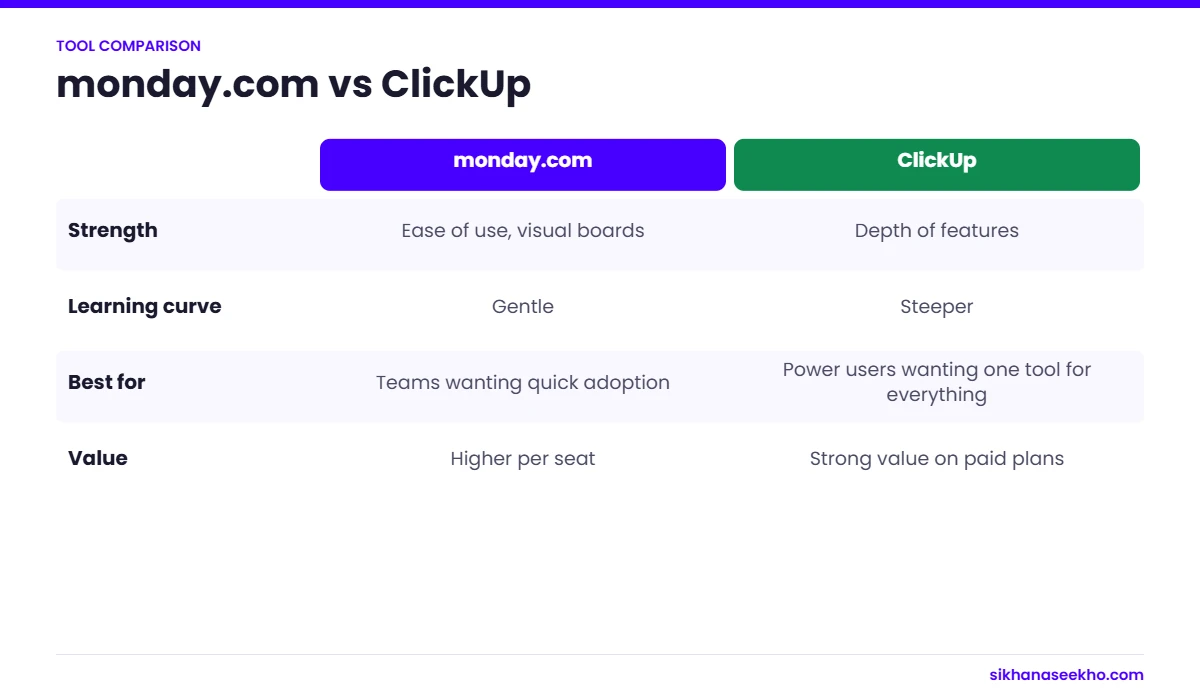
The template library covers 200 plus ready-made boards for project tracking, CRM, HR, marketing and more. Onboarding flows are polished and context-aware. The learning curve is genuinely shallow. Non-technical users adopt it with minimal friction.
- Average time to first meaningful board: around 20 minutes
- Template quality is consistently excellent
- Consistent UI across web, desktop and mobile
- G2 Ease of Use rating: 8.8/10
ClickUp is powerful but complex. The sheer volume of features, views and customisation options can overwhelm new users. The interface is dense. New users frequently spend their first sessions configuring rather than working.
ClickUp acknowledges this with extensive documentation, an academy and a simplified mode that hides advanced features. But even simplified ClickUp requires more investment to get started than monday.com. Teams with technical backgrounds typically adapt faster. Non-technical teams often struggle with the initial learning curve.
- Average time to first meaningful workspace: 45 to 90 minutes
- Templates available but require more customisation
- Feature density can feel overwhelming initially
- G2 Ease of Use rating: 8.4/10
monday.com organises work around boards. Each row is a task or item. Key views include Board (table), Timeline (Gantt-style), Calendar, Kanban, Map and Workload. Views are polished and well-designed but Monday keeps the set deliberately curated rather than exhaustive.
Task fields (called columns) are highly customisable. Status, dates, people, numbers, dropdowns, formulas and more. Sub-items allow one level of task nesting. Cross-board dependencies and mirrored columns allow information to flow between boards, but the hierarchy is simpler than ClickUp's.
- 8 standard views
- Sub-items supported (one level deep)
- 30 plus column types
- Cross-board linking via Mirror Columns
ClickUp offers the most comprehensive task management of any platform in its class. Tasks can have subtasks, nested subtasks, checklists, custom fields, multiple assignees, watchers, tags, priorities and custom statuses. All within a single task. The hierarchy from Workspace down to Subtask is deeply configurable.
Views include List, Board, Calendar, Gantt, Timeline, Workload, Table, Mind Map, Chat, Embed and more. 15 plus distinct views in total. Each view can be configured independently. Team members can work in different views of the same data at the same time.
- 15 plus views including Mind Map and Chat view
- Unlimited task nesting depth
- 35 plus custom field types including formula and AI fields
- Multiple assignees per task on all plans
- Task dependencies with blocking and waiting indicators
monday.com's Timeline view is one of the most visually polished Gantt implementations available. Drag-to-adjust durations, colour-coding by group or status, baseline tracking and critical path highlighting are all included on the Standard plan and above. The interface is clean enough that stakeholders unfamiliar with Gantt charts can read it at a glance.
Dependencies between tasks are set with simple arrows. Monday clearly shows the impact of delays cascading through the timeline. The Workload view shows resource utilisation alongside the timeline for capacity planning without switching tools.
ClickUp's Gantt view is powerful and fully functional. Dependencies, critical path, baseline tracking and milestone markers are all present. However, the interface is denser than monday.com's and the interaction model is less polished. Loading times on large projects can be slower.
The Gantt view is available on all paid plans. The Timeline view (a simpler variation) is available on the free plan. ClickUp's Gantt handles complex multi-project portfolios well once configured, but requires more initial setup than monday.com.
monday.com's automation is genuinely approachable. The "If this, then that" builder uses plain-English triggers and actions that non-technical users can set up without help. 250 plus pre-built automation recipes cover the most common scenarios. Cross-board automation works seamlessly.
Automation limits are generous on Standard (250 actions per month) and scale on higher tiers. Native integrations with Slack, Gmail, Outlook, Jira and Salesforce are supported as automation triggers and actions. Not just passive syncs.
ClickUp's automation is powerful and highly configurable. More conditions and actions are available than monday.com. However, the builder is more complex and requires more familiarity before it becomes natural. Custom triggers include status changes, date conditions, field values, assignee changes and more.
The free plan includes 100 automation uses per month. Paid plans scale to unlimited automations on Business and above. ClickUp also supports automations triggered by AI on higher plans, enabling text-based condition matching that monday.com does not yet offer.
monday.com's dashboards are its showpiece feature at the Pro tier and above. Drag-and-drop widgets pull live data from any connected board. Dashboards can aggregate data from multiple boards into a single executive view. Portfolio-level reporting is genuinely useful.
Chart visualisations are polished and presentation-ready without further configuration. Workload reports show individual capacity utilisation with traffic-light indicators. Dashboards can be shared publicly or with specific team members.
ClickUp Dashboards are highly customisable with 50 plus widget types covering tasks, sprints, portfolios, goals and custom fields. The breadth of available widgets exceeds monday.com's, but the visual quality is less polished and configuration requires more effort to produce clean, executive-ready outputs.
ClickUp's reporting strengths are in sprint and Agile reporting. Velocity charts, burndown and cycle time are areas where monday.com has no native equivalents. For engineering and product teams running Scrum, ClickUp's reporting is considerably more relevant.
monday.com offers 200 plus native integrations including Salesforce, HubSpot, Jira, GitHub, Slack, Microsoft Teams, Zoom, Google Workspace, DocuSign, Zendesk and Shopify. The integration quality is generally high. Two-way syncs with Salesforce and Jira are genuinely robust.
The Monday Apps Marketplace extends this further with custom integrations and partner-built apps. monday.com's Workdocs also integrates with Google Drive and Dropbox for file management within boards.
ClickUp offers 1,000 plus integrations via native connections and Zapier/Make. Native integrations with GitHub, GitLab, Slack, Google Drive, Dropbox, Figma, Loom and Zoom are solid. The developer API is more accessible than monday.com's, making custom integrations easier to build.
ClickUp's deep integrations with developer tools make it the better choice for software development teams that need code commits and pull requests to appear alongside task progress.
monday.com launched AI features in 2024 with "monday AI". It can write update summaries, generate task descriptions, translate content and classify items. The features are accessible and polished but relatively limited compared to ClickUp's AI offering.
AI features are available as an add-on across all paid plans. The focus is on automating content within the existing monday.com workflow rather than fundamentally changing how users interact with the platform.
ClickUp AI (branded as "ClickUp Brain") is one of the most comprehensive AI implementations in project management. It can write and edit task descriptions, generate project plans from text prompts, summarise comment threads, create sub-tasks from descriptions, answer questions about your workspace data and draft documents.
ClickUp Brain is available as an add-on at $7 per member per month on Business and above. The depth of AI integration across tasks, documents and automations positions ClickUp ahead of monday.com in AI capability as of 2026.
monday.com vs ClickUp: Pricing Comparison
Value summary: ClickUp offers substantially more features per pound, particularly at the entry paid tier. monday.com's Standard plan (around £12 per user per month) competes with ClickUp's Business plan (around £9 per user per month) in terms of feature coverage, making monday.com roughly 25 to 35% more expensive for equivalent functionality. For cost-conscious teams, ClickUp is the clear winner on value. For teams where adoption and polish justify premium pricing, monday.com's higher cost is defensible.
Full Feature Comparison Table
| Feature | monday.com | ClickUp |
|---|---|---|
| Free plan | 2 seats max, limited features | Unlimited members, unlimited tasks Better |
| Entry paid price | ~£9 per user per month (min 3 seats) | ~£5 per user per month (no minimum) Better |
| Ease of onboarding | Excellent. 20 min to first board Better | Steeper learning curve |
| Number of views | 8 views | 15 plus views including Mind Map Better |
| Task nesting | Sub-items (1 level) | Unlimited nested subtasks Better |
| Gantt / Timeline | More polished visual UI Better | Functional but less visual |
| Automation builder | Simpler, more accessible Better | More powerful but complex |
| Automation actions per month (paid) | 250 to 25,000 by plan | Unlimited on Business Plus Better |
| Custom fields | 30 plus column types | 35 plus field types including AI fields Better |
| AI assistant | monday AI, add-on, limited | ClickUp Brain, deeper integration Better |
| Time tracking | Pro plan and above only | All plans including free Better |
| Docs / Notes | Workdocs (good) | ClickUp Docs, more powerful Better |
| Dashboards | More polished, executive-ready Better | More widget types but less polished |
| Agile / Scrum tools | Basic sprint tracking | Native sprints, velocity, burndown Better |
| Salesforce integration | Native, two-way, robust Better | Via Zapier/Make primarily |
| Developer tool integrations | GitHub, GitLab available | Deeper developer tool integrations Better |
| Mobile app quality | More polished, consistent UI Better | Feature-complete but less refined |
| Guest / external access | Both support external guests | Both support external guests |
| Offline functionality | Limited offline support | Better offline mode Better |
| Enterprise security | SOC 2, ISO 27001, HIPAA Better | SOC 2, ISO 27001 (no HIPAA) |
Pros and Cons Summary
monday.com
- Easiest onboarding of any enterprise PM tool
- Visually polished. Boards and dashboards look professional immediately.
- Excellent Timeline / Gantt view for stakeholder presentations
- Robust native integrations with Salesforce, HubSpot and Jira
- Automation builder is accessible to non-technical users
- Reliable uptime and strong enterprise support
- HIPAA compliance available for healthcare teams
- Consistent experience across web, desktop and mobile
- More expensive per user than ClickUp for equivalent features
- Minimum 3 seats on all paid plans
- Free plan severely limited (2 seats, 1,000 items)
- Sub-items only one level deep. Complex hierarchies are awkward.
- Only 8 views. Less flexibility than ClickUp.
- Agile/Scrum tools are basic compared to ClickUp
- AI features less capable than ClickUp Brain
- Fewer custom field types than ClickUp
ClickUp
- Best-value free plan in the PM software market
- Lower paid pricing than monday.com
- Most views of any comparable platform (15 plus)
- Unlimited task nesting for complex project hierarchies
- ClickUp Brain is the most capable PM AI assistant
- Native Agile tools: sprints, velocity, burndown, cycle time
- Unlimited automations on Business plan
- Better developer tool integrations
- Built-in time tracking on all plans
- Offline mode more capable than monday.com
- Steep learning curve. Overwhelming for non-technical users.
- Interface can feel cluttered and dense
- Can take weeks to fully configure for a team's needs
- Mobile app less polished than monday.com
- Dashboard widgets require more configuration effort
- Salesforce and enterprise CRM integrations not as robust
- No HIPAA compliance
- Occasional performance issues on very large workspaces
Who Should Use monday.com vs ClickUp?
- Your team includes non-technical users who will struggle with complex software
- Adoption speed matters. You need everyone using the tool within days, not weeks.
- You present project status to senior stakeholders or clients who need visually clear dashboards and Gantt charts
- Your team is in sales, marketing or operations and uses Salesforce or HubSpot as a core system
- You are in a regulated industry (healthcare, finance) and need HIPAA compliance
- Your organisation is large (500 plus employees) and needs enterprise support and SLA guarantees
- You want a polished, consistent experience across all devices and use cases
- Your projects are primarily linear (campaigns, launches, onboarding flows) rather than complex nested programmes
- Your team is technically comfortable and willing to invest time in configuration
- You are a small team or solo operator. ClickUp's free plan is far more generous.
- You are running software development and need native Agile tools (sprints, velocity, burndown)
- Your projects involve complex hierarchies, multiple nested sub-tasks and interdependencies
- Budget is a primary constraint. ClickUp delivers more at lower cost.
- You want to replace multiple tools (project management, docs and time tracking) with one platform
- Your team will benefit from AI assistance throughout the workflow (ClickUp Brain)
- You need deep integrations with GitHub, GitLab or other developer tools
- You want unlimited automations without monitoring monthly quotas
monday vs ClickUp: The Bottom Line
The monday.com vs ClickUp debate does not have a single right answer. It has a right answer for your team. The key question is not which tool has more features. It is which tool your team will actually adopt and use consistently.
monday.com is the better choice when adoption is the primary risk. Its visual polish, shallow learning curve and accessible automation builder mean that teams across all technical levels can get value from it within days. If your organisation has experienced tool abandonment in the past, monday.com is significantly more likely to achieve organisation-wide adoption than ClickUp.
ClickUp is the better choice when capability and value are the primary constraints. If your team has the technical confidence to invest time in configuration, ClickUp will ultimately do more for less money. Its free plan alone outperforms monday.com's paid Basic plan, and its depth in task management, AI, developer integrations and Agile reporting makes it the more powerful long-term platform.
Ready to Choose Your PM Tool?
Start with the free plans on both platforms. monday.com's free tier is sufficient for a 2-person evaluation. ClickUp's Free Forever plan gives you full access to test features without a time limit.