Software Reviews · 2026 Edition
Smartsheet Review 2026: The Excel Alternative
Is it a spreadsheet or a PM tool? For teams that need high-level data management with project collaboration, Smartsheet remains a top contender. Here is our honest breakdown.
✦
From my experience: Coming from construction, where a lot of planning lived in spreadsheets, I understand why Smartsheet appeals to teams that think in rows and columns. My advice to students is to check whether your team needs proper dependency scheduling before committing to it.
★
The Quick Verdict
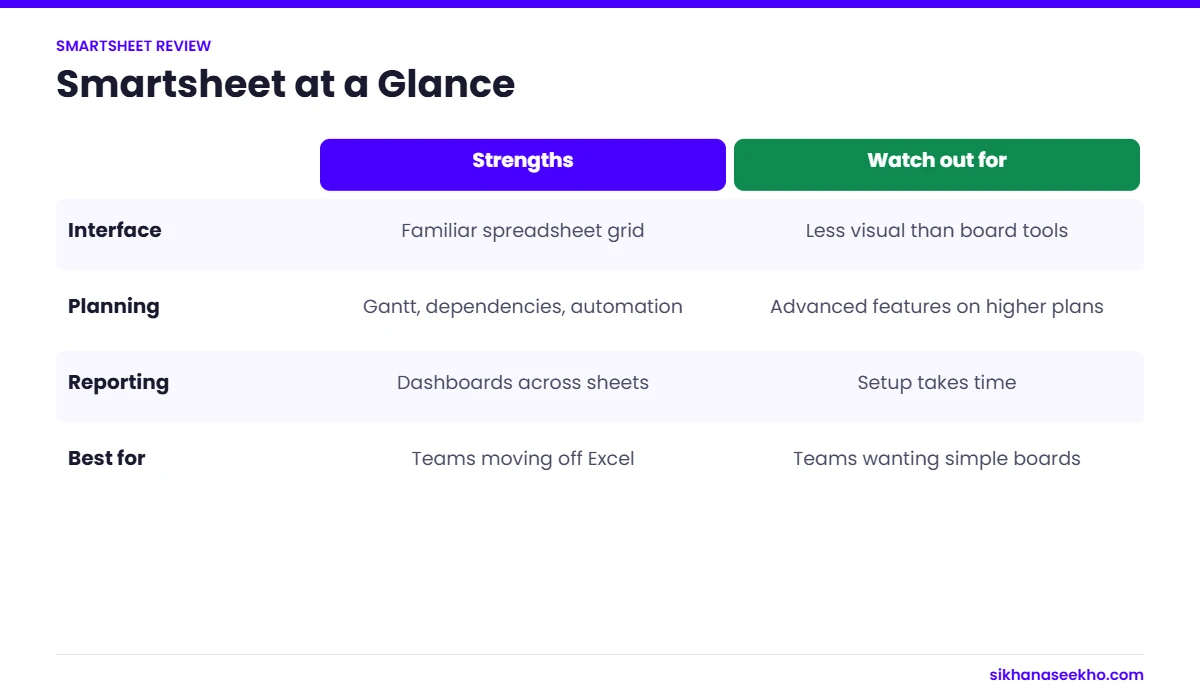
Best for project leaders who want the flexibility of Excel but need Gantt charts, automated workflows, and dashboards to manage complex portfolios.
Pros
- • Powerful automation without coding
- • Familiar spreadsheet-like interface
- • Superior reporting and dashboards
- • Enterprise-grade security features
Cons
- • Steep learning curve for advanced features
- • Limited creative/visual project views
- • Add-ons can get expensive
- • No "free-forever" personal tier
Key Features to Watch
Smartsheet bridges the gap between simple list-making and heavy-duty Enterprise Resource Planning (ERP). Key highlights include:
- Grid, Gantt, and Card Views: Switch between data formats instantly.
- Bridge: Advanced cross-platform workflow automation.
- Dynamic View: Share specific data with stakeholders without giving them sheet access.
Looking for more PM Software?
Compare Smartsheet with 15+ other top-tier tools in our full Project Management Software directory.
Browse All Software Reviews