
PMP login means signing in to your PMI account on the official site, pmi.org. The same login opens your PMI dashboard, where you track your PMP application, find your exam eligibility ID, schedule the exam, report PDUs and download your certificate. Sikhana Seekho is not PMI: this is an independent step-by-step guide.
Updated November 2026. Sikhana Seekho is an independent PMP training site. We are not PMI and this is not the PMI login page. To sign in, go to the official site at https://www.pmi.org/. We will never ask for your PMI password.
Once you hold the PMP, most of your credential admin happens in your PMI account: checking your certification status and expiry date, logging professional development units (PDUs), paying your renewal fee and downloading your certificate. This guide explains how to log in, where to find each of those things and what to do when login fails.
PMP login: how to log in to your PMI account
- Go to the official PMI website at pmi.org. Always type the address yourself rather than following a link in an email.
- Select Log In at the top right of the page.
- Enter the email address you used when you applied for the exam and your password.
- Complete any verification step PMI asks for, such as a code sent to your email.
- You land on your dashboard, where your certifications, membership and orders are listed.
Your PMP certification login is the same as your normal PMI login, so use one account for everything. Candidates who create a second account when their email changes often find their exam history, PDUs and membership split across two profiles, which PMI support then has to merge.
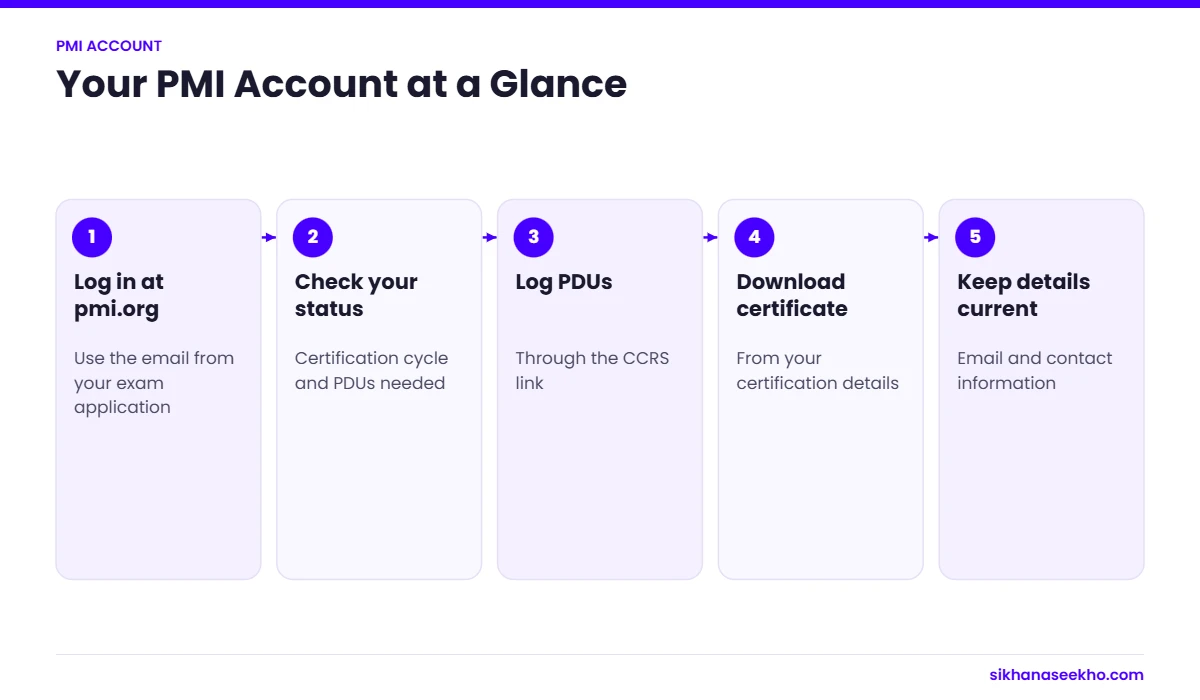
PMP dashboard: what you can do there
- Check your certification status: see whether your PMP is active, when the current three-year cycle ends and how many PDUs you still need.
- Find your PMI ID and certification number: employers and training providers often ask for these.
- Download your certificate: a digital copy of your PMP certificate is available from your certification details.
- Manage membership: join or renew PMI membership, which lowers the exam and renewal fees.
- Update your profile: keep your email address, name and contact details current so renewal reminders reach you.
Where to find each task on your PMP dashboard
Once you are logged in, your PMI dashboard shows your certifications, orders and membership. These are the PMP tasks people search for most, and where they sit.
PMP dashboard: common tasks
| Task | What you see on the dashboard | When you need it |
|---|---|---|
| Application status | Your PMP application with its current stage, for example submitted, under review, audit or approved | After you submit your application |
| Exam eligibility ID | Shown with your approved application. You need it to book your exam | After PMI approves your application |
| Scheduling the exam | A link from your approved application to book, move or cancel your exam with Pearson VUE, PMI’s test provider | When you are ready to book a date |
| CCR and PDU reporting | The Continuing Certification Requirements System (CCRS), where you claim PDUs and see how many you still need | Throughout your 3-year cycle |
| Certificate download | Your certification details, with a digital certificate and badge | After you pass, or when an employer asks for proof |
PMP renewal at a glance
| Item | Requirement |
|---|---|
| Certification cycle | 3 years from the date you passed |
| PDUs needed | 60 PDUs per 3-year cycle |
| Education PDUs | At least 35 across Ways of Working, Power Skills and Business Acumen |
| Giving Back PDUs | Up to 25 of the 60 |
| Renewal fee | $60 for PMI members, $150 for non-members |
| Where to log PDUs | Continuing Certification Requirements System (CCRS) in your PMI account |
Source: PMI Continuing Certification Requirements Handbook. Check pmi.org for current rules.
Logging PDUs and renewing your PMP
PDUs are recorded in PMI’s Continuing Certification Requirements System (CCRS), which you reach from your dashboard with the same login. You need 60 PDUs every three years, split between Education (with a minimum in each area of the PMI Talent Triangle) and Giving Back, which is capped. Once you have enough PDUs, the renewal fee becomes payable and your new cycle starts when your current one ends.
For a full list of free and paid PDU sources and the exact split, read our guide on how to earn 60 PDUs for PMP renewal, and our PMP renewal guide for deadlines and fees.
How to check a PMP credential online
PMI publishes an online Certification Registry where anyone can check a credential, without logging in.
- Open the PMI Certification Registry on pmi.org.
- Search by the person’s name.
- Check the credential (for example PMP) and that its status is active.
If you do not appear, check that your registry listing is switched on in your account privacy settings. Sharing your digital badge on LinkedIn is another quick way to prove your status.
PMI login problems and fixes
Quick fixes for common PMI login problems
| Problem | What to try |
|---|---|
| Forgot password | Use the forgotten password link on the pmi.org login page. The reset email can take a few minutes, so check your spam folder. |
| Account locked | Wait before trying again, or reset your password. If it stays locked, contact PMI Customer Care with your PMI ID ready. |
| Dashboard not loading | Clear your browser cache, try a private window or a different browser, and turn off ad blockers for pmi.org. |
| Two accounts or duplicate email | If your PDUs, exam results or membership are missing, you may be logged in to a second account. Ask PMI Customer Care to merge the records. |
| No access to your old email | Contact PMI Customer Care with your PMI ID or certification number so they can update the email on your account. |
| SSO sign-in fails | If you usually sign in through a single sign-on (SSO) option and it fails, try your email and password on pmi.org instead, or reset the password. If your organisation manages your access, ask its admin. |
Only log in at the official pmi.org site
Your PMI account holds your certification record and payment history, so treat the login like a bank login. Type pmi.org into your browser yourself, and check the address bar before you enter your password. Be wary of emails or lookalike sites that ask you to log in through a link. Use a unique password, and never share it with training providers, including us. Genuine renewal reminders never need your password.
How do you plan your PDUs over 3 years?
Spread the work out. 60 PDUs over 3 years is 20 a year, or under 2 a month. Logging as you go is far easier than finding 60 hours of learning in the final few months.
Plan a mix. At least 35 PDUs must be education, split across the 3 areas of the PMI Talent Triangle: Ways of Working, Power Skills and Business Acumen. Up to 25 can be Giving Back, which includes working as a project manager, volunteering, mentoring and creating content.
Good sources of education PDUs include PMI webinars, chapter events, online courses, podcasts from registered providers and books. Keep a short note of each activity, the date, the provider and the hours, in case PMI audits your renewal.
Check your progress once a quarter in your PMI account so you are never surprised by your expiry date.
What should you do if you cannot log in?
First, use the forgotten password link on the PMI sign-in page and check your spam folder for the reset email. Make sure you are using the email address on your PMI account; many people have an old work email registered.
If the account is locked or you no longer have access to that email, contact PMI customer care through the help pages on pmi.org and have your PMI ID and certification number ready. Never share your password with training providers or third parties, and turn on any extra security PMI offers for your account.
Keep your contact details up to date after a job change, so renewal reminders and audit emails reach you in time.
How do employers verify your PMP?
Employers can check PMI’s online certification registry, which lists certified professionals by name, credential and status unless you have opted out. If an employer cannot find you, check that your registry details are visible in your PMI account settings and that your name matches the one on your CV.
You can also download a digital certificate or badge from your account and share it with employers. Many professionals add the digital badge to their LinkedIn profile so recruiters can verify it with 1 click.
If your certification has lapsed, the registry will show it as inactive, so keep renewal on track: 60 PDUs every 3 years, with the renewal fee paid through the same account.
What can you download from your PMI account?
Your account lets you download a PDF certificate, access your digital badge, view your exam results history and see the date your current cycle ends. If you need a printed certificate, PMI explains the current options on its help pages.
It also holds your PDU history in the Continuing Certification Requirements System, which is the record PMI uses if you are selected for a renewal audit. Upload or keep evidence for each activity, such as course completion certificates, so you can respond quickly.
If you hold more than 1 PMI certification, such as PMP and PMI-ACP, the same account shows each credential with its own cycle. Some PDUs can count towards more than 1 certification, so plan your learning to cover both.
Bookmark the PMI sign-in page and save your PMI ID in a password manager, so you can reach your account quickly whenever an employer, auditor or training provider asks for proof of your certification status.
If you change your name, for example after marriage, update it with PMI so your certificate and registry entry match your ID and CV.
PMP login and PMI dashboard: FAQ
Is the PMP login the same as my PMI login?
Yes. PMI uses one account for exam applications, certifications, membership and PDU reporting.
Where do I find my PMP expiry date?
Log in and open your certification details on the dashboard. The end of your current three-year cycle is shown there, along with the PDUs you have earned so far.
What happens if my PMP expires?
PMI gives a suspension period after the cycle ends during which you can still complete your PDUs and renew. After that the credential expires, so check your dates well before the deadline.
How do I check a PMP credential online?
Use the PMI Certification Registry at pmi.org. Search by the person’s name and check that the credential shows as active. You do not need to log in to search.
Why is my PMI dashboard not loading?
Clear your browser cache, try a private window or another browser, and turn off ad blockers for pmi.org. If it still does not load, wait a while and try again, as the site can be busy, then contact PMI Customer Care.
Is Sikhana Seekho the official PMP login page?
No. Sikhana Seekho is an independent training site, not PMI. This page is a guide only. Log in only at the official site, pmi.org, and never enter your PMI password on any other website.
Keep learning
- PMP® Exam Prep 2026 by Mujeeb Rehman
- PMP Certification Guide 2026: Everything You Need to Pass
- Free PMP Study Guide 2026: Full PMBOK 8 Prep Plan
- 200 PMP Practice Exam Questions 2026: With Answers
- PMP Exam Eligibility Requirements 2026
- PMP Exam Cost 2026: All Fees & How to Save Money